Android开发工具系之ADB
ADB的相关概念&工作原理通过WLAN使用ADB感觉这个挺有意思,但是又在情理之中。1、电脑与设备连入同一个局域网,并能连通。2、将设备接上电脑,设置端口。λ adb tcpip 5555restarting in TCP mode port: 55553、断开设备4、找出设备的IP地址5、
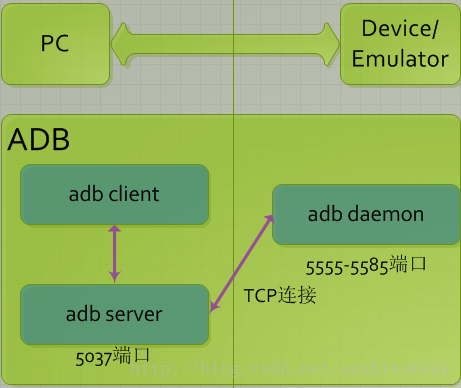
ADB的相关概念&工作原理
通过WLAN使用ADB
感觉这个挺有意思,但是又在情理之中。 1、电脑与设备连入同一个局域网,并能连通。 2、将设备接上电脑,设置端口。
λ adb tcpip 5555
restarting in TCP mode port: 5555
3、断开设备 4、找出设备的IP地址 5、连接设备
λ adb cconnect 10.240.100.52
connected to 10.240.100.52:5555

λ adb devices
List of devices attached
10.240.100.52:5555      device
一些常用参数&命令
- 多个设备连接时,对特定设备进行操作
-s serial_number:-e:-d: - 安装/卸载应用
install path_to_apk:uninstall package_name: - 端口转发
forward local remote - push/pull
pull remote localpush local remote: - 开启/关闭adb服务器
start-serverkill-server - 其它
wait-for-device cmds:等待设备在线了执行cmds 如:adb wait-for-device install app.apk
解决adb remount后还是提示Read-Only file system的问题
需要用到最新的adb 工具包,因为它才支持adb disable-verity命令,如果是Linux开发环境,则可使用工程编译结果目录out/host/linux-x86/bin下的adb执行文件。
- 什么样的才算是最新的呢?这个不太好说啊,如果提示没有那个命令,那么应该旅就是adb的版本问题。我输入
adb version后的信息如下:
➜ ~ adb version
Android Debug Bridge version 1.0.39
Revision 3db08f2c6889-android
Installed as /Users/asahi/Library/Android/sdk/platform-tools/adb
步骤如下:
adb root
adb disable-verity
adb reboot
adb root
adb remount
现在可以对system分区进行读写了
adb shell
- am 用法特别多
start intentforce-stop pkg_name - pm 用法特别多
path pkg_name - dumpsys
- screencap
- screenrecord
adb help
Android Debug Bridge version 1.0.32

 -a                            - directs adb to listen on all interfaces for a connection
 -d                            - directs command to the only connected USB device
                                 returns an error if more than one USB device is present.
 -e                            - directs command to the only running emulator.
                                 returns an error if more than one emulator is running.
 -s <specific device>          - directs command to the device or emulator with the given
                                 serial number or qualifier. Overrides ANDROID_SERIAL
                                 environment variable.
 -p <product name or path>     - simple product name like 'sooner', or
                                 a relative/absolute path to a product
                                 out directory like 'out/target/product/sooner'.
                                 If -p is not specified, the ANDROID_PRODUCT_OUT
                                 environment variable is used, which must
                                 be an absolute path.
 -H                            - Name of adb server host (default: localhost)
 -P                            - Port of adb server (default: 5037)
 devices [-l]                  - list all connected devices
                                 ('-l' will also list device qualifiers)
 connect <host>[:<port>]       - connect to a device via TCP/IP
                                 Port 5555 is used by default if no port number is specified.
 disconnect [<host>[:<port>]]  - disconnect from a TCP/IP device.
                                 Port 5555 is used by default if no port number is specified.
                                 Using this command with no additional arguments
                                 will disconnect from all connected TCP/IP devices.

device commands:
  adb push [-p] <local> <remote>
                               - copy file/dir to device
                                 ('-p' to display the transfer progress)
  adb pull [-p] [-a] <remote> [<local>]
                               - copy file/dir from device
                                 ('-p' to display the transfer progress)
                                 ('-a' means copy timestamp and mode)
  adb sync [ <directory> ]     - copy host->device only if changed
                                 (-l means list but don't copy)
                                 (see 'adb help all')
  adb shell                    - run remote shell interactively
  adb shell <command>          - run remote shell command
  adb emu <command>            - run emulator console command
  adb logcat [ <filter-spec> ] - View device log
  adb forward --list           - list all forward socket connections.
                                 the format is a list of lines with the following format:
                                    <serial> " " <local> " " <remote> "\n"
  adb forward <local> <remote> - forward socket connections
                                 forward specs are one of:
                                   tcp:<port>
                                   localabstract:<unix domain socket name>
                                   localreserved:<unix domain socket name>
                                   localfilesystem:<unix domain socket name>
                                   dev:<character device name>
                                   jdwp:<process pid> (remote only)
  adb forward --no-rebind <local> <remote>
                               - same as 'adb forward <local> <remote>' but fails
                                 if <local> is already forwarded
  adb forward --remove <local> - remove a specific forward socket connection
  adb forward --remove-all     - remove all forward socket connections
  adb reverse --list           - list all reverse socket connections from device
  adb reverse <remote> <local> - reverse socket connections
                                 reverse specs are one of:
                                   tcp:<port>
                                   localabstract:<unix domain socket name>
                                   localreserved:<unix domain socket name>
                                   localfilesystem:<unix domain socket name>
  adb reverse --norebind <remote> <local>
                               - same as 'adb reverse <remote> <local>' but fails
                                 if <remote> is already reversed.
  adb reverse --remove <remote>
                               - remove a specific reversed socket connection
  adb reverse --remove-all     - remove all reversed socket connections from device
  adb jdwp                     - list PIDs of processes hosting a JDWP transport
  adb install [-lrtsd] <file>
  adb install-multiple [-lrtsdp] <file...>
                               - push this package file to the device and install it
                                 (-l: forward lock application)
                                 (-r: replace existing application)
                                 (-t: allow test packages)
                                 (-s: install application on sdcard)
                                 (-d: allow version code downgrade)
                                 (-p: partial application install)
  adb uninstall [-k] <package> - remove this app package from the device
                                 ('-k' means keep the data and cache directories)
  adb bugreport                - return all information from the device
                                 that should be included in a bug report.

  adb backup [-f <file>] [-apk|-noapk] [-obb|-noobb] [-shared|-noshared] [-all] [-system|-nosystem] [<packages...>]
                               - write an archive of the device's data to <file>.
                                 If no -f option is supplied then the data is written
                                 to "backup.ab" in the current directory.
                                 (-apk|-noapk enable/disable backup of the .apks themselves
                                    in the archive; the default is noapk.)
                                 (-obb|-noobb enable/disable backup of any installed apk expansion
                                    (aka .obb) files associated with each application; the default
                                    is noobb.)
                                 (-shared|-noshared enable/disable backup of the device's
                                    shared storage / SD card contents; the default is noshared.)
                                 (-all means to back up all installed applications)
                                 (-system|-nosystem toggles whether -all automatically includes
                                    system applications; the default is to include system apps)
                                 (<packages...> is the list of applications to be backed up.  If
                                    the -all or -shared flags are passed, then the package
                                    list is optional.  Applications explicitly given on the
                                    command line will be included even if -nosystem would
                                    ordinarily cause them to be omitted.)

  adb restore <file>           - restore device contents from the <file> backup archive

  adb help                     - show this help message
  adb version                  - show version num

scripting:
  adb wait-for-device          - block until device is online
  adb start-server             - ensure that there is a server running
  adb kill-server              - kill the server if it is running
  adb get-state                - prints: offline | bootloader | device
  adb get-serialno             - prints: <serial-number>
  adb get-devpath              - prints: <device-path>
  adb status-window            - continuously print device status for a specified device
  adb remount                  - remounts the /system and /vendor (if present) partitions on the device read-write
  adb reboot [bootloader|recovery] - reboots the device, optionally into the bootloader or recovery program
  adb reboot-bootloader        - reboots the device into the bootloader
  adb root                     - restarts the adbd daemon with root permissions
  adb usb                      - restarts the adbd daemon listening on USB
  adb tcpip <port>             - restarts the adbd daemon listening on TCP on the specified port
networking:
  adb ppp <tty> [parameters]   - Run PPP over USB.
 Note: you should not automatically start a PPP connection.
 <tty> refers to the tty for PPP stream. Eg. dev:/dev/omap_csmi_tty1
 [parameters] - Eg. defaultroute debug dump local notty usepeerdns

adb sync notes: adb sync [ <directory> ]
  <localdir> can be interpreted in several ways:

  - If <directory> is not specified, /system, /vendor (if present), and /data partitions will be updated.

  - If it is "system", "vendor" or "data", only the corresponding partition
    is updated.

environmental variables:
  ADB_TRACE                    - Print debug information. A comma separated list of the following values
                                 1 or all, adb, sockets, packets, rwx, usb, sync, sysdeps, transport, jdwp
  ANDROID_SERIAL               - The serial number to connect to. -s takes priority over this if given.
  ANDROID_LOG_TAGS             - When used with the logcat option, only these debug tags are printed.
