Ansible ad-hoc 执行流程
背景
Ansible 封装了很多脚本,以 Module、Play 的形式呈现,这里以一条简单的 shell 命令作为切入点。 在开始前,将目标机的信息,先写入 cat /etc/ansible/hosts 中。
9.134.124.159:36000
所用到的命令如下:
ansible all -vvv -a "ls /root" -u root
通过打开一些 debug 日志,可以确定执行连接操作时,一定会执行 ansible/lib/ansible/plugins/connection/ssh.py 中的代码。
执行步骤
完整的日志
META: ran handlers
<9.134.124.159> ESTABLISH SSH CONNECTION FOR USER: root
<9.134.124.159> SSH: EXEC ssh -C -o ControlMaster=auto -o ControlPersist=60s -o Port=36000 -o KbdInteractiveAuthentication=no -o PreferredAuthentications=gssapi-with-mic,gssapi-keyex,hostbased,publickey -o PasswordAuthentication=no -o 'User="root"' -o ConnectTimeout=10 -o ControlPath=/Users/yangyu/.ansible/cp/4846fe66a5 9.134.124.159 '/bin/sh -c '"'"'echo ~root && sleep 0'"'"''
<9.134.124.159> (0, b'/root\n', b'')

<9.134.124.159> ESTABLISH SSH CONNECTION FOR USER: root
<9.134.124.159> SSH: EXEC ssh -C -o ControlMaster=auto -o ControlPersist=60s -o Port=36000 -o KbdInteractiveAuthentication=no -o PreferredAuthentications=gssapi-with-mic,gssapi-keyex,hostbased,publickey -o PasswordAuthentication=no -o 'User="root"' -o ConnectTimeout=10 -o ControlPath=/Users/yangyu/.ansible/cp/4846fe66a5 9.134.124.159 '/bin/sh -c '"'"'( umask 77 && mkdir -p "` echo /root/.ansible/tmp `"&& mkdir "` echo /root/.ansible/tmp/ansible-tmp-1599536717.558343-92837-98923700243036 `" && echo ansible-tmp-1599536717.558343-92837-98923700243036="` echo /root/.ansible/tmp/ansible-tmp-1599536717.558343-92837-98923700243036 `" ) && sleep 0'"'"''
<9.134.124.159> (0, b'ansible-tmp-1599536717.558343-92837-98923700243036=/root/.ansible/tmp/ansible-tmp-1599536717.558343-92837-98923700243036\n', b'')

<9.134.124.159> Attempting python interpreter discovery
<9.134.124.159> ESTABLISH SSH CONNECTION FOR USER: root
<9.134.124.159> SSH: EXEC ssh -C -o ControlMaster=auto -o ControlPersist=60s -o Port=36000 -o KbdInteractiveAuthentication=no -o PreferredAuthentications=gssapi-with-mic,gssapi-keyex,hostbased,publickey -o PasswordAuthentication=no -o 'User="root"' -o ConnectTimeout=10 -o ControlPath=/Users/yangyu/.ansible/cp/4846fe66a5 9.134.124.159 '/bin/sh -c '"'"'echo PLATFORM; uname; echo FOUND; command -v '"'"'"'"'"'"'"'"'/usr/bin/python'"'"'"'"'"'"'"'"'; command -v '"'"'"'"'"'"'"'"'python3.7'"'"'"'"'"'"'"'"'; command -v '"'"'"'"'"'"'"'"'python3.6'"'"'"'"'"'"'"'"'; command -v '"'"'"'"'"'"'"'"'python3.5'"'"'"'"'"'"'"'"'; command -v '"'"'"'"'"'"'"'"'python2.7'"'"'"'"'"'"'"'"'; command -v '"'"'"'"'"'"'"'"'python2.6'"'"'"'"'"'"'"'"'; command -v '"'"'"'"'"'"'"'"'/usr/libexec/platform-python'"'"'"'"'"'"'"'"'; command -v '"'"'"'"'"'"'"'"'/usr/bin/python3'"'"'"'"'"'"'"'"'; command -v '"'"'"'"'"'"'"'"'python'"'"'"'"'"'"'"'"'; echo ENDFOUND && sleep 0'"'"''
<9.134.124.159> (0, b'PLATFORM\nLinux\nFOUND\n/usr/bin/python\n/usr/bin/python3.6\n/usr/bin/python2.7\n/usr/bin/python2.6\n/usr/libexec/platform-python\n/usr/bin/python3\n/usr/bin/python\nENDFOUND\n', b'')

<9.134.124.159> ESTABLISH SSH CONNECTION FOR USER: root
<9.134.124.159> SSH: EXEC ssh -C -o ControlMaster=auto -o ControlPersist=60s -o Port=36000 -o KbdInteractiveAuthentication=no -o PreferredAuthentications=gssapi-with-mic,gssapi-keyex,hostbased,publickey -o PasswordAuthentication=no -o 'User="root"' -o ConnectTimeout=10 -o ControlPath=/Users/yangyu/.ansible/cp/4846fe66a5 9.134.124.159 '/bin/sh -c '"'"'/usr/bin/python && sleep 0'"'"''
<9.134.124.159> (0, b'{"osrelease_content": "NAME=\\"Tencent tlinux\\"\\nVERSION=\\"2.2 (Final)\\"\\nID=\\"tlinux\\"\\nID_LIKE=\\"rhel fedora centos\\"\\nVERSION_ID=\\"2.2\\"\\nPRETTY_NAME=\\"Tencent tlinux 2.2 (Final)\\"\\nANSI_COLOR=\\"0;31\\"\\nCPE_NAME=\\"cpe:/o:tlinux:linux:2\\"\\nHOME_URL=\\"http://tlinux.oa.com/\\"\\nBUG_REPORT_URL=\\"http://tapd.oa.com/tlinux/bugtrace/bugreports/my_view/\\"\\n\\n", "platform_dist_result": ["centos", "7.2", "Final"]}\n', b'')

Using module file /Users/yangyu/projects/ansible/lib/ansible/modules/command.py
<9.134.124.159> PUT /Users/yangyu/.ansible/tmp/ansible-local-9283485g9ot9_/tmpkr7p4e1t TO /root/.ansible/tmp/ansible-tmp-1599536717.558343-92837-98923700243036/AnsiballZ_command.py
<9.134.124.159> SSH: EXEC sftp -b - -C -o ControlMaster=auto -o ControlPersist=60s -o Port=36000 -o KbdInteractiveAuthentication=no -o PreferredAuthentications=gssapi-with-mic,gssapi-keyex,hostbased,publickey -o PasswordAuthentication=no -o 'User="root"' -o ConnectTimeout=10 -o ControlPath=/Users/yangyu/.ansible/cp/4846fe66a5 '[9.134.124.159]'
<9.134.124.159> (0, b'sftp> put /Users/yangyu/.ansible/tmp/ansible-local-9283485g9ot9_/tmpkr7p4e1t /root/.ansible/tmp/ansible-tmp-1599536717.558343-92837-98923700243036/AnsiballZ_command.py\n', b'')

<9.134.124.159> ESTABLISH SSH CONNECTION FOR USER: root
<9.134.124.159> SSH: EXEC ssh -C -o ControlMaster=auto -o ControlPersist=60s -o Port=36000 -o KbdInteractiveAuthentication=no -o PreferredAuthentications=gssapi-with-mic,gssapi-keyex,hostbased,publickey -o PasswordAuthentication=no -o 'User="root"' -o ConnectTimeout=10 -o ControlPath=/Users/yangyu/.ansible/cp/4846fe66a5 9.134.124.159 '/bin/sh -c '"'"'chmod u+x /root/.ansible/tmp/ansible-tmp-1599536717.558343-92837-98923700243036/ /root/.ansible/tmp/ansible-tmp-1599536717.558343-92837-98923700243036/AnsiballZ_command.py && sleep 0'"'"''
<9.134.124.159> (0, b'', b'')

<9.134.124.159> ESTABLISH SSH CONNECTION FOR USER: root
<9.134.124.159> SSH: EXEC ssh -C -o ControlMaster=auto -o ControlPersist=60s -o Port=36000 -o KbdInteractiveAuthentication=no -o PreferredAuthentications=gssapi-with-mic,gssapi-keyex,hostbased,publickey -o PasswordAuthentication=no -o 'User="root"' -o ConnectTimeout=10 -o ControlPath=/Users/yangyu/.ansible/cp/4846fe66a5 -tt 9.134.124.159 '/bin/sh -c '"'"'/usr/bin/python /root/.ansible/tmp/ansible-tmp-1599536717.558343-92837-98923700243036/AnsiballZ_command.py && sleep 0'"'"''
<9.134.124.159> (0, b'\r\n{"changed": true, "end": "2020-09-08 11:45:53.183432", "stdout": "11.sh\\n11.zip\\nInstallHalyard.sh\\n[\\nabc.txt\\nagent.zip\\nbefore.txt\\ncloud-agent.log\\nclouddriver-prome.yaml\\nclouddriver.git?token=bd40137b365a6a789b7f5904cff87958ba5b158b\\nclouddriver.log\\ncoding-cd\\ncoding-cd-grpc.yaml\\nconfig_hub_oa_com.sh\\nconfig_vscode_server.sh\\ndemo\\ndemo.yaml\\ndev\\ndevopsAgent\\ndevopsDaemon\\nenable_internet_proxy.sh\\nfile.txt\\nfix_devcloud.logs\\ngeneric-aloe.txt\\nhi.db\\niProxy.sh\\nindex.html\\ninit_data_disk.sh\\ninit_devcloud_remote.sh\\ninstall.sh\\ninstallAgent.sh\\ninstall_ift.sh\\njre\\njre.zip\\nlog.txt\\nlogs\\npost-script.text\\nprome.yaml\\npush_master\\nrevert_image_source.sh\\nruntime\\nset_linux_welcome.sh\\nstart.sh\\nstop.sh\\nszx\\ntelegraf.conf\\nuninstall.sh\\nworker-agent.jar\\nworkspace", "cmd": ["ls", "/root"], "rc": 0, "start": "2020-09-08 11:45:53.178756", "stderr": "", "delta": "0:00:00.004676", "invocation": {"module_args": {"creates": null, "executable": null, "_uses_shell": false, "strip_empty_ends": true, "_raw_params": "ls /root", "removes": null, "argv": null, "warn": false, "chdir": null, "stdin_add_newline": true, "stdin": null}}}\r\n', b'Shared connection to 9.134.124.159 closed.\r\n')

<9.134.124.159> ESTABLISH SSH CONNECTION FOR USER: root
<9.134.124.159> SSH: EXEC ssh -C -o ControlMaster=auto -o ControlPersist=60s -o Port=36000 -o KbdInteractiveAuthentication=no -o PreferredAuthentications=gssapi-with-mic,gssapi-keyex,hostbased,publickey -o PasswordAuthentication=no -o 'User="root"' -o ConnectTimeout=10 -o ControlPath=/Users/yangyu/.ansible/cp/4846fe66a5 9.134.124.159 '/bin/sh -c '"'"'rm -f -r /root/.ansible/tmp/ansible-tmp-1599536717.558343-92837-98923700243036/ > /dev/null 2>&1 && sleep 0'"'"''
<9.134.124.159> (0, b'', b'')
9.134.124.159 | CHANGED | rc=0 >>
11.sh
11.zip
InstallHalyard.sh
[
abc.txt
...
META: ran handlers
META: ran handlers

Process finished with exit code 0
对上述日志进行简化,可知其大致有 7 个步骤,分别如下:
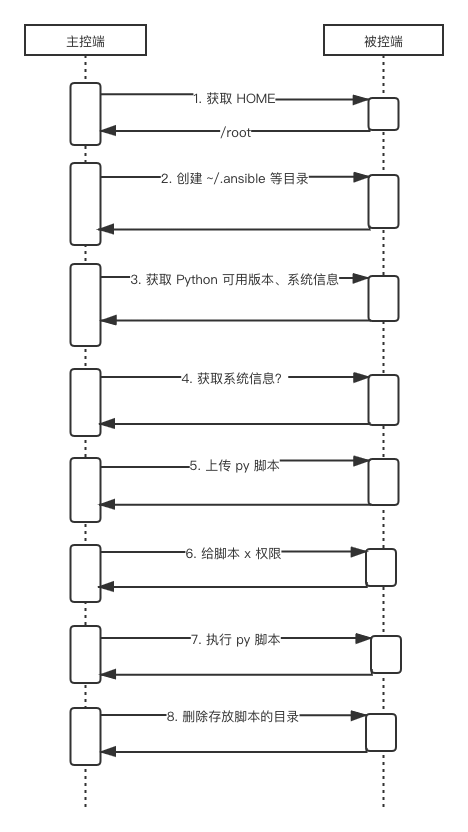
简化后,其所执行的命令如下:
ssh -C -o ControlMaster=auto -o ControlPersist=60s -o Port=36000 -o KbdInteractiveAuthentication=no -o PreferredAuthentications=gssapi-with-mic,gssapi-keyex,hostbased,publickey -o PasswordAuthentication=no -o 'User="root"' -o ConnectTimeout=10 -o ControlPath=/Users/yangyu/.ansible/cp/4846fe66a5 9.134.124.159 '/bin/sh -c '"'"'echo ~root && sleep 0'"'"''
ssh -C -o ControlMaster=auto -o ControlPersist=60s -o Port=36000 -o KbdInteractiveAuthentication=no -o PreferredAuthentications=gssapi-with-mic,gssapi-keyex,hostbased,publickey -o PasswordAuthentication=no -o 'User="root"' -o ConnectTimeout=10 -o ControlPath=/Users/yangyu/.ansible/cp/4846fe66a5 9.134.124.159 '/bin/sh -c '"'"'( umask 77 && mkdir -p "` echo /root/.ansible/tmp `"&& mkdir "` echo /root/.ansible/tmp/ansible-tmp-1599546740.791937-1678-254955456024140 `" && echo ansible-tmp-1599546740.791937-1678-254955456024140="` echo /root/.ansible/tmp/ansible-tmp-1599546740.791937-1678-254955456024140 `" ) && sleep 0'"'"''
ssh -C -o ControlMaster=auto -o ControlPersist=60s -o Port=36000 -o KbdInteractiveAuthentication=no -o PreferredAuthentications=gssapi-with-mic,gssapi-keyex,hostbased,publickey -o PasswordAuthentication=no -o 'User="root"' -o ConnectTimeout=10 -o ControlPath=/Users/yangyu/.ansible/cp/4846fe66a5 9.134.124.159 '/bin/sh -c '"'"'echo PLATFORM; uname; echo FOUND; command -v '"'"'"'"'"'"'"'"'/usr/bin/python'"'"'"'"'"'"'"'"'; command -v '"'"'"'"'"'"'"'"'python3.7'"'"'"'"'"'"'"'"'; command -v '"'"'"'"'"'"'"'"'python3.6'"'"'"'"'"'"'"'"'; command -v '"'"'"'"'"'"'"'"'python3.5'"'"'"'"'"'"'"'"'; command -v '"'"'"'"'"'"'"'"'python2.7'"'"'"'"'"'"'"'"'; command -v '"'"'"'"'"'"'"'"'python2.6'"'"'"'"'"'"'"'"'; command -v '"'"'"'"'"'"'"'"'/usr/libexec/platform-python'"'"'"'"'"'"'"'"'; command -v '"'"'"'"'"'"'"'"'/usr/bin/python3'"'"'"'"'"'"'"'"'; command -v '"'"'"'"'"'"'"'"'python'"'"'"'"'"'"'"'"'; echo ENDFOUND && sleep 0'"'"''
ssh -C -o ControlMaster=auto -o ControlPersist=60s -o Port=36000 -o KbdInteractiveAuthentication=no -o PreferredAuthentications=gssapi-with-mic,gssapi-keyex,hostbased,publickey -o PasswordAuthentication=no -o 'User="root"' -o ConnectTimeout=10 -o ControlPath=/Users/yangyu/.ansible/cp/4846fe66a5 9.134.124.159 '/bin/sh -c '"'"'/usr/bin/python && sleep 0'"'"''
sftp -b - -C -o ControlMaster=auto -o ControlPersist=60s -o Port=36000 -o KbdInteractiveAuthentication=no -o PreferredAuthentications=gssapi-with-mic,gssapi-keyex,hostbased,publickey -o PasswordAuthentication=no -o 'User="root"' -o ConnectTimeout=10 -o ControlPath=/Users/yangyu/.ansible/cp/4846fe66a5 '[9.134.124.159]'
ssh -C -o ControlMaster=auto -o ControlPersist=60s -o Port=36000 -o KbdInteractiveAuthentication=no -o PreferredAuthentications=gssapi-with-mic,gssapi-keyex,hostbased,publickey -o PasswordAuthentication=no -o 'User="root"' -o ConnectTimeout=10 -o ControlPath=/Users/yangyu/.ansible/cp/4846fe66a5 9.134.124.159 '/bin/sh -c '"'"'chmod u+x /root/.ansible/tmp/ansible-tmp-1599546740.791937-1678-254955456024140/ /root/.ansible/tmp/ansible-tmp-1599546740.791937-1678-254955456024140/AnsiballZ_command.py && sleep 0'"'"''
ssh -C -o ControlMaster=auto -o ControlPersist=60s -o Port=36000 -o KbdInteractiveAuthentication=no -o PreferredAuthentications=gssapi-with-mic,gssapi-keyex,hostbased,publickey -o PasswordAuthentication=no -o 'User="root"' -o ConnectTimeout=10 -o ControlPath=/Users/yangyu/.ansible/cp/4846fe66a5 -tt 9.134.124.159 '/bin/sh -c '"'"'/usr/bin/python /root/.ansible/tmp/ansible-tmp-1599546740.791937-1678-254955456024140/AnsiballZ_command.py && sleep 0'"'"''
ssh -C -o ControlMaster=auto -o ControlPersist=60s -o Port=36000 -o KbdInteractiveAuthentication=no -o PreferredAuthentications=gssapi-with-mic,gssapi-keyex,hostbased,publickey -o PasswordAuthentication=no -o 'User="root"' -o ConnectTimeout=10 -o ControlPath=/Users/yangyu/.ansible/cp/4846fe66a5 9.134.124.159 '/bin/sh -c '"'"'rm -f -r /root/.ansible/tmp/ansible-tmp-1599546740.791937-1678-254955456024140/ > /dev/null 2>&1 && sleep 0'"'"''
上传到被控端的文件
上传到被控制的文件,在 ~/.ansible/tmp/xxx 下,是一个 Python 脚本,名称为:AnsiballZ_command.py,里面还包含一段压缩文件的 base64。代码如下:
#!/usr/bin/python
# -*- coding: utf-8 -*-
_ANSIBALLZ_WRAPPER = True # For test-module.py script to tell this is a ANSIBALLZ_WRAPPER
def _ansiballz_main():

    import os
    import os.path
    import sys
    import __main__
    scriptdir = None
    try:
        scriptdir = os.path.dirname(os.path.realpath(__main__.__file__))
    except (AttributeError, OSError):
        pass
    excludes = set(('', '.', scriptdir))
    sys.path = [p for p in sys.path if p not in excludes]
    import base64
    import runpy
    import shutil
    import tempfile
    import zipfile
    if sys.version_info < (3,):
        PY3 = False
    else:
        PY3 = True
    # ZIPDATA 的值已经省略
    ZIPDATA = """xxxxxxxxxxx"""
    def invoke_module(modlib_path, temp_path, json_params):
        z = zipfile.ZipFile(modlib_path, mode='a')
        sitecustomize = u'import sys\nsys.path.insert(0,"%s")\n' %  modlib_path
        sitecustomize = sitecustomize.encode('utf-8')
        zinfo = zipfile.ZipInfo()
        zinfo.filename = 'sitecustomize.py'
        zinfo.date_time = ( 2020, 9, 7, 5, 54, 28)
        z.writestr(zinfo, sitecustomize)
        z.close()
        sys.path.insert(0, modlib_path)
        from ansible.module_utils import basic
        basic._ANSIBLE_ARGS = json_params

        runpy.run_module(mod_name='ansible.modules.command', init_globals=None, run_name='__main__', alter_sys=True)
        print('{"msg": "New-style module did not handle its own exit", "failed": true}')
        sys.exit(1)
    def debug(command, zipped_mod, json_params):
        basedir = os.path.join(os.path.abspath(os.path.dirname(__file__)), 'debug_dir')
        args_path = os.path.join(basedir, 'args')
        if command == 'explode':
            z = zipfile.ZipFile(zipped_mod)
            for filename in z.namelist():
                if filename.startswith('/'):
                    raise Exception('Something wrong with this module zip file: should not contain absolute paths')
                dest_filename = os.path.join(basedir, filename)
                if dest_filename.endswith(os.path.sep) and not os.path.exists(dest_filename):
                    os.makedirs(dest_filename)
                else:
                    directory = os.path.dirname(dest_filename)
                    if not os.path.exists(directory):
                        os.makedirs(directory)
                    f = open(dest_filename, 'wb')
                    f.write(z.read(filename))
                    f.close()
            f = open(args_path, 'wb')
            f.write(json_params)
            f.close()
            print('Module expanded into:')
            print('%s' % basedir)
            exitcode = 0
        elif command == 'execute':
            sys.path.insert(0, basedir)
            with open(args_path, 'rb') as f:
                json_params = f.read()
            from ansible.module_utils import basic
            basic._ANSIBLE_ARGS = json_params
            runpy.run_module(mod_name='ansible.modules.command', init_globals=None, run_name='__main__', alter_sys=True)
            print('{"msg": "New-style module did not handle its own exit", "failed": true}')
            sys.exit(1)
        else:
            print('WARNING: Unknown debug command.  Doing nothing.')
            exitcode = 0
        return exitcode
    ANSIBALLZ_PARAMS = '{"ANSIBLE_MODULE_ARGS": {"_raw_params": "ls /root", "_ansible_check_mode": false, "_ansible_no_log": false, "_ansible_debug": false, "_ansible_diff": false, "_ansible_verbosity": 3, "_ansible_version": "2.11.0.dev0", "_ansible_module_name": "ansible.legacy.command", "_ansible_syslog_facility": "LOG_USER", "_ansible_selinux_special_fs": ["fuse", "nfs", "vboxsf", "ramfs", "9p", "vfat"], "_ansible_string_conversion_action": "warn", "_ansible_socket": null, "_ansible_shell_executable": "/bin/sh", "_ansible_keep_remote_files": false, "_ansible_tmpdir": "/root/.ansible/tmp/ansible-tmp-1599457948.85933-15430-201759115318770/", "_ansible_remote_tmp": "~/.ansible/tmp"}}'
    if PY3:
        ANSIBALLZ_PARAMS = ANSIBALLZ_PARAMS.encode('utf-8')
    try:
        temp_path = tempfile.mkdtemp(prefix='ansible_ansible.legacy.command_payload_')
        zipped_mod = os.path.join(temp_path, 'ansible_ansible.legacy.command_payload.zip')
        with open(zipped_mod, 'wb') as modlib:
            modlib.write(base64.b64decode(ZIPDATA))
        if len(sys.argv) == 2:
            exitcode = debug(sys.argv[1], zipped_mod, ANSIBALLZ_PARAMS)
        else:
            invoke_module(zipped_mod, temp_path, ANSIBALLZ_PARAMS)
    finally:
        try:
            shutil.rmtree(temp_path)
        except (NameError, OSError):
            pass
    sys.exit(exitcode)
if __name__ == '__main__':
    _ansiballz_main()
当 AnsiballZ_command.py 执行时,会首先将 ZIPDATA 还原成一个压缩文件,然后在压缩文件中加入一个 sitecustomize.py。准备完成后,将以 runpy.run_module() 的方式,执行压缩文件中的 Python 代码。可以看出,我们所需要执行的命令,储存在 ANSIBALLZ_PARAMS 变量中,并赋值给了 basic._ANSIBLE_ARGS。
ZIPDATA 压缩包
首先,压缩文件中的内容如下。此压缩包通过手段获取到后,解压后,名称为 ansible,里面的文件如 basic.py、command.py 来自所执行命令 ansible 所在的包下。
╰─$ tree ansible
ansible
├── __init__.py
├── module_utils
│   ├── __init__.py
│   ├── _text.py
│   ├── basic.py
│   ├── common
│   │   ├── __init__.py
│   │   ├── _collections_compat.py
│   │   ├── _json_compat.py
│   │   ├── _utils.py
│   │   ├── collections.py
│   │   ├── file.py
│   │   ├── parameters.py
│   │   ├── process.py
│   │   ├── sys_info.py
│   │   ├── text
│   │   │   ├── __init__.py
│   │   │   ├── converters.py
│   │   │   └── formatters.py
│   │   ├── validation.py
│   │   └── warnings.py
│   ├── compat
│   │   ├── __init__.py
│   │   ├── _selectors2.py
│   │   └── selectors.py
│   ├── distro
│   │   ├── __init__.py
│   │   └── _distro.py
│   ├── parsing
│   │   ├── __init__.py
│   │   └── convert_bool.py
│   ├── pycompat24.py
│   └── six
│       └── __init__.py
└── modules
    ├── __init__.py
    └── command.py
其次,压缩文件中代码的执行。从 runpy.run_module 中的 mod_name='ansible.modules.command' 猜测,是要执行压缩包下的 modules/command.py。此文件的执行,包括了一个 AnsibleModule 的初始化,在它的构造函数中,可以看出来,获取了 basic._ANSIBLE_ARGS 的值。
class AnsibleModule(object):
    def __init__(self, argument_spec, bypass_checks=False, no_log=False,
                 mutually_exclusive=None, required_together=None,
                 required_one_of=None, add_file_common_args=False,
                 supports_check_mode=False, required_if=None, required_by=None):
        ...

        self._load_params()
        ...

##############################basic.py##############################
def _load_params(self):
    self.params = _load_params()
##############################basic.py##############################
def _load_params():
    global _ANSIBLE_ARGS
    if _ANSIBLE_ARGS is not None:
        buffer = _ANSIBLE_ARGS
    ....
最终,从 command.py 执行到 basic.py,以开启执行系统命令,作为我们所要脚本(即:ls /root)执行的开始
cmd = subprocess.Popen(args, **kwargs)
等待 shell 命令执行完毕
在此处,为 cmd 的 stdout、stderr 注册了可读事件到 selector,并在一个死循环中轮训 selector,如果有 cmd.stdout、cmd.stderr 可读事件,就将对应的数据,追加到相应的变量上。当 cmd 执行完成后,退出死循环,并返回 cmd 执行后的 stdout、stderr。
selector.register(cmd.stdout, selectors.EVENT_READ)
selector.register(cmd.stderr, selectors.EVENT_READ)
...
while True:
    events = selector.select(1)
    for key, event in events:
        b_chunk = key.fileobj.read()
        if b_chunk == b(''):
            selector.unregister(key.fileobj)
        if key.fileobj == cmd.stdout:
            stdout += b_chunk
        elif key.fileobj == cmd.stderr:
            stderr += b_chunk
    ...
    # only break out if no pipes are left to read or
    # the pipes are completely read and
    # the process is terminated
    if (not events or not selector.get_map()) and cmd.poll() is not None:
        break
    # No pipes are left to read but process is not yet terminated
    # Only then it is safe to wait for the process to be finished
    # NOTE: Actually cmd.poll() is always None here if no selectors are left
    elif not selector.get_map() and cmd.poll() is None:
        cmd.wait()
        # The process is terminated. Since no pipes to read from are
        # left, there is no need to call select() again.
        break
...
return (rc, stdout, stderr)
控制中心
是什么地方定义上上面这 8 个步骤?产生上面 8 个步骤的地方,开始于:ansible/plugins/action/command.py,其中 self._execute_module() 完成了前面的 7 个操作,self._remove_tmp_path() 完成了删除 ~/.ansible/tmp/xxxxx 的任务。
重试机制
- 什么时候进行重试
- an exception is caught
- ssh returns 255(ControlPersist 超时不能用或者远程主机连不上)
- 什么时候不进行重试。
- sshpass returns 5 (invalid password, to prevent account lockouts)
- remaining_tries is < 2
- retries limit reached
重试的方式,是通过一个对连接函数的闭包操作完成。
def _ssh_retry(func):
    @wraps(func)
    def wrapped(self, *args, **kwargs):
        remaining_tries = int(C.ANSIBLE_SSH_RETRIES) + 1
        cmd_summary = u"%s..." % to_text(args[0])
        conn_password = self.get_option('password') or self._play_context.password
        for attempt in range(remaining_tries):
            ...
    return wrapped
################################################################
@_ssh_retry
def _run(self, cmd, in_data, sudoable=True, checkrc=True):
    """Wrapper around _bare_run that retries the connection
    """
    return self._bare_run(cmd, in_data, sudoable=sudoable, checkrc=checkrc)
