Ansible playbook 执行流程
背景
超时主要分两个场景,一个是建立 SSH 连接时,另外一个为通过 SSH 执行命令时的超时。前者主要依靠 SSH 命令的自带参数 ConnectTimeout,后者则有一套 Ansible 自己的实现。
建立连接超时
ansible 2 -u root -m ping -T 30。底层实现使用 ssh -o ConnectTimeout=30。

执行命令超时(playbook)
在 playbook 的 task 中加入 async 和 poll 属性。
async表示这个step的最长等待时长, 如果设置为0, 表示一直等待下去直到动作完成;poll表示检查step操作结果的间隔时长,poll 设置为0, 表示不用等待执行结果, 该step执行成功。
测试用的 playbook 如下:
---
    - hosts: "1"
      vars:
        http_port: 80
        max_clients: 200
      remote_user: root
      tasks:
      - name: Sleep30s
        shell:
          "sleep 30s"
        async: 10
        poll: 1
启动命令如下:
ansible-playbook pb.yml
效果:
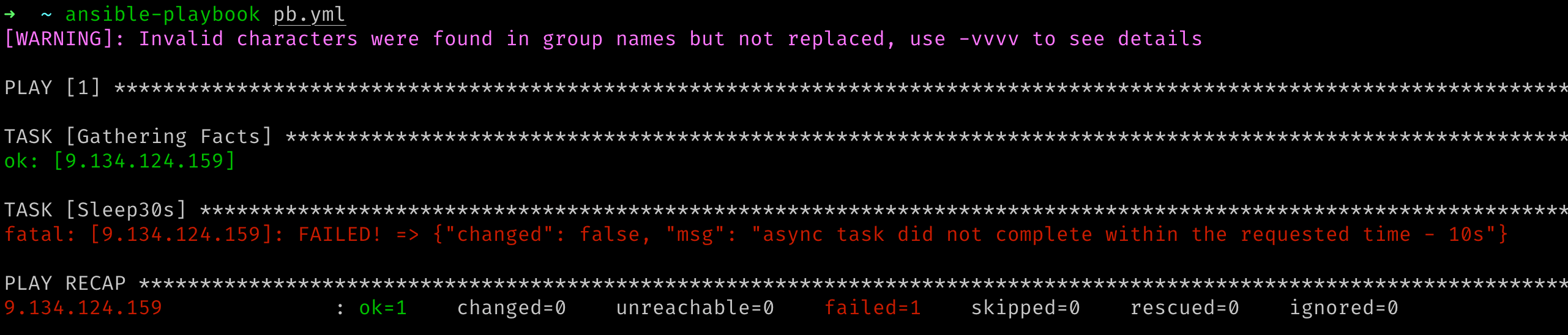
执行命令超时(playbook)的流程
在此 playbook 中,有一个 task,但是在执行上面定义的 task 之前,会执行一个 Gathering Facts 的 task,这里将此不太相干的 task 去掉了。task Sleep30s 的执行日志如下:
TASK [Sleep30s] ****************************************************************
task path: /Users/yangyu/pb.yml:8
<9.134.124.159> ESTABLISH SSH CONNECTION FOR USER: root
<9.134.124.159> SSH: EXEC ssh -C -o ControlMaster=auto -o ControlPersist=60s -o Port=36000 -o KbdInteractiveAuthentication=no -o PreferredAuthentications=gssapi-with-mic,gssapi-keyex,hostbased,publickey -o PasswordAuthentication=no -o 'User="root"' -o ConnectTimeout=10 -o ControlPath=/Users/yangyu/.ansible/cp/4846fe66a5 9.134.124.159 '/bin/sh -c '"'"'echo ~root && sleep 0'"'"''
<9.134.124.159> (0, b'/root\n', b'')

<9.134.124.159> ESTABLISH SSH CONNECTION FOR USER: root
<9.134.124.159> SSH: EXEC ssh -C -o ControlMaster=auto -o ControlPersist=60s -o Port=36000 -o KbdInteractiveAuthentication=no -o PreferredAuthentications=gssapi-with-mic,gssapi-keyex,hostbased,publickey -o PasswordAuthentication=no -o 'User="root"' -o ConnectTimeout=10 -o ControlPath=/Users/yangyu/.ansible/cp/4846fe66a5 9.134.124.159 '/bin/sh -c '"'"'( umask 77 && mkdir -p "` echo /root/.ansible/tmp `"&& mkdir "` echo /root/.ansible/tmp/ansible-tmp-1600333356.414965-42861-191307013081145 `" && echo ansible-tmp-1600333356.414965-42861-191307013081145="` echo /root/.ansible/tmp/ansible-tmp-1600333356.414965-42861-191307013081145 `" ) && sleep 0'"'"''
<9.134.124.159> (0, b'ansible-tmp-1600333356.414965-42861-191307013081145=/root/.ansible/tmp/ansible-tmp-1600333356.414965-42861-191307013081145\n', b'')

Using module file /Users/yangyu/projects/ansible/lib/ansible/modules/command.py
<9.134.124.159> PUT /Users/yangyu/.ansible/tmp/ansible-local-42839upbl7lkg/tmp_66m3nen TO /root/.ansible/tmp/ansible-tmp-1600333356.414965-42861-191307013081145/AnsiballZ_command.py
<9.134.124.159> SSH: EXEC sftp -b - -C -o ControlMaster=auto -o ControlPersist=60s -o Port=36000 -o KbdInteractiveAuthentication=no -o PreferredAuthentications=gssapi-with-mic,gssapi-keyex,hostbased,publickey -o PasswordAuthentication=no -o 'User="root"' -o ConnectTimeout=10 -o ControlPath=/Users/yangyu/.ansible/cp/4846fe66a5 '[9.134.124.159]'
<9.134.124.159> (0, b'sftp> put /Users/yangyu/.ansible/tmp/ansible-local-42839upbl7lkg/tmp_66m3nen /root/.ansible/tmp/ansible-tmp-1600333356.414965-42861-191307013081145/AnsiballZ_command.py\n', b'')


<9.134.124.159> PUT /Users/yangyu/.ansible/tmp/ansible-local-42839upbl7lkg/tmplmizhdvg TO /root/.ansible/tmp/ansible-tmp-1600333356.414965-42861-191307013081145/async_wrapper.py
<9.134.124.159> SSH: EXEC sftp -b - -C -o ControlMaster=auto -o ControlPersist=60s -o Port=36000 -o KbdInteractiveAuthentication=no -o PreferredAuthentications=gssapi-with-mic,gssapi-keyex,hostbased,publickey -o PasswordAuthentication=no -o 'User="root"' -o ConnectTimeout=10 -o ControlPath=/Users/yangyu/.ansible/cp/4846fe66a5 '[9.134.124.159]'
<9.134.124.159> (0, b'sftp> put /Users/yangyu/.ansible/tmp/ansible-local-42839upbl7lkg/tmplmizhdvg /root/.ansible/tmp/ansible-tmp-1600333356.414965-42861-191307013081145/async_wrapper.py\n', b'')


<9.134.124.159> ESTABLISH SSH CONNECTION FOR USER: root
<9.134.124.159> SSH: EXEC ssh -C -o ControlMaster=auto -o ControlPersist=60s -o Port=36000 -o KbdInteractiveAuthentication=no -o PreferredAuthentications=gssapi-with-mic,gssapi-keyex,hostbased,publickey -o PasswordAuthentication=no -o 'User="root"' -o ConnectTimeout=10 -o ControlPath=/Users/yangyu/.ansible/cp/4846fe66a5 9.134.124.159 '/bin/sh -c '"'"'chmod u+x /root/.ansible/tmp/ansible-tmp-1600333356.414965-42861-191307013081145/ /root/.ansible/tmp/ansible-tmp-1600333356.414965-42861-191307013081145/AnsiballZ_command.py /root/.ansible/tmp/ansible-tmp-1600333356.414965-42861-191307013081145/async_wrapper.py && sleep 0'"'"''
<9.134.124.159> (0, b'', b'')


<9.134.124.159> ESTABLISH SSH CONNECTION FOR USER: root
<9.134.124.159> SSH: EXEC ssh -C -o ControlMaster=auto -o ControlPersist=60s -o Port=36000 -o KbdInteractiveAuthentication=no -o PreferredAuthentications=gssapi-with-mic,gssapi-keyex,hostbased,publickey -o PasswordAuthentication=no -o 'User="root"' -o ConnectTimeout=10 -o ControlPath=/Users/yangyu/.ansible/cp/4846fe66a5 -tt 9.134.124.159 '/bin/sh -c '"'"'ANSIBLE_ASYNC_DIR='"'"'"'"'"'"'"'"'~/.ansible_async'"'"'"'"'"'"'"'"' /usr/bin/python /root/.ansible/tmp/ansible-tmp-1600333356.414965-42861-191307013081145/async_wrapper.py 48991476669 10 /root/.ansible/tmp/ansible-tmp-1600333356.414965-42861-191307013081145/AnsiballZ_command.py _ && sleep 0'"'"''
<9.134.124.159> (0, b'{"started": 1, "_ansible_suppress_tmpdir_delete": true, "finished": 0, "results_file": "/root/.ansible_async/48991476669.20840", "ansible_job_id": "48991476669.20840"}\r\n', b'Shared connection to 9.134.124.159 closed.\r\n')


<9.134.124.159> ESTABLISH SSH CONNECTION FOR USER: root
<9.134.124.159> SSH: EXEC ssh -C -o ControlMaster=auto -o ControlPersist=60s -o Port=36000 -o KbdInteractiveAuthentication=no -o PreferredAuthentications=gssapi-with-mic,gssapi-keyex,hostbased,publickey -o PasswordAuthentication=no -o 'User="root"' -o ConnectTimeout=10 -o ControlPath=/Users/yangyu/.ansible/cp/4846fe66a5 9.134.124.159 '/bin/sh -c '"'"'echo ~root && sleep 0'"'"''
<9.134.124.159> (0, b'/root\n', b'')


<9.134.124.159> ESTABLISH SSH CONNECTION FOR USER: root
<9.134.124.159> SSH: EXEC ssh -C -o ControlMaster=auto -o ControlPersist=60s -o Port=36000 -o KbdInteractiveAuthentication=no -o PreferredAuthentications=gssapi-with-mic,gssapi-keyex,hostbased,publickey -o PasswordAuthentication=no -o 'User="root"' -o ConnectTimeout=10 -o ControlPath=/Users/yangyu/.ansible/cp/4846fe66a5 9.134.124.159 '/bin/sh -c '"'"'( umask 77 && mkdir -p "` echo /root/.ansible/tmp `"&& mkdir "` echo /root/.ansible/tmp/ansible-tmp-1600333358.847193-42861-146017266031103 `" && echo ansible-tmp-1600333358.847193-42861-146017266031103="` echo /root/.ansible/tmp/ansible-tmp-1600333358.847193-42861-146017266031103 `" ) && sleep 0'"'"''
<9.134.124.159> (0, b'ansible-tmp-1600333358.847193-42861-146017266031103=/root/.ansible/tmp/ansible-tmp-1600333358.847193-42861-146017266031103\n', b'')


Using module file /Users/yangyu/projects/ansible/lib/ansible/modules/async_status.py
<9.134.124.159> PUT /Users/yangyu/.ansible/tmp/ansible-local-42839upbl7lkg/tmpgapz8kyp TO /root/.ansible/tmp/ansible-tmp-1600333358.847193-42861-146017266031103/AnsiballZ_async_status.py
<9.134.124.159> SSH: EXEC sftp -b - -C -o ControlMaster=auto -o ControlPersist=60s -o Port=36000 -o KbdInteractiveAuthentication=no -o PreferredAuthentications=gssapi-with-mic,gssapi-keyex,hostbased,publickey -o PasswordAuthentication=no -o 'User="root"' -o ConnectTimeout=10 -o ControlPath=/Users/yangyu/.ansible/cp/4846fe66a5 '[9.134.124.159]'
<9.134.124.159> (0, b'sftp> put /Users/yangyu/.ansible/tmp/ansible-local-42839upbl7lkg/tmpgapz8kyp /root/.ansible/tmp/ansible-tmp-1600333358.847193-42861-146017266031103/AnsiballZ_async_status.py\n', b'')

<9.134.124.159> ESTABLISH SSH CONNECTION FOR USER: root
<9.134.124.159> SSH: EXEC ssh -C -o ControlMaster=auto -o ControlPersist=60s -o Port=36000 -o KbdInteractiveAuthentication=no -o PreferredAuthentications=gssapi-with-mic,gssapi-keyex,hostbased,publickey -o PasswordAuthentication=no -o 'User="root"' -o ConnectTimeout=10 -o ControlPath=/Users/yangyu/.ansible/cp/4846fe66a5 9.134.124.159 '/bin/sh -c '"'"'chmod u+x /root/.ansible/tmp/ansible-tmp-1600333358.847193-42861-146017266031103/ /root/.ansible/tmp/ansible-tmp-1600333358.847193-42861-146017266031103/AnsiballZ_async_status.py && sleep 0'"'"''
<9.134.124.159> (0, b'', b'')


<9.134.124.159> ESTABLISH SSH CONNECTION FOR USER: root
<9.134.124.159> SSH: EXEC ssh -C -o ControlMaster=auto -o ControlPersist=60s -o Port=36000 -o KbdInteractiveAuthentication=no -o PreferredAuthentications=gssapi-with-mic,gssapi-keyex,hostbased,publickey -o PasswordAuthentication=no -o 'User="root"' -o ConnectTimeout=10 -o ControlPath=/Users/yangyu/.ansible/cp/4846fe66a5 -tt 9.134.124.159 '/bin/sh -c '"'"'/usr/bin/python /root/.ansible/tmp/ansible-tmp-1600333358.847193-42861-146017266031103/AnsiballZ_async_status.py && sleep 0'"'"''
<9.134.124.159> (0, b'\r\n{"started": 1, "invocation": {"module_args": {"jid": "48991476669.20840", "mode": "status", "_async_dir": "/root/.ansible_async"}}, "finished": 0, "ansible_job_id": "48991476669.20840"}\r\n', b'Shared connection to 9.134.124.159 closed.\r\n')
ASYNC POLL on 9.134.124.159: jid=48991476669.20840 started=1 finished=0


Using module file /Users/yangyu/projects/ansible/lib/ansible/modules/async_status.py
<9.134.124.159> PUT /Users/yangyu/.ansible/tmp/ansible-local-42839upbl7lkg/tmpph94rjs7 TO /root/.ansible/tmp/ansible-tmp-1600333358.847193-42861-146017266031103/AnsiballZ_async_status.py
<9.134.124.159> SSH: EXEC sftp -b - -C -o ControlMaster=auto -o ControlPersist=60s -o Port=36000 -o KbdInteractiveAuthentication=no -o PreferredAuthentications=gssapi-with-mic,gssapi-keyex,hostbased,publickey -o PasswordAuthentication=no -o 'User="root"' -o ConnectTimeout=10 -o ControlPath=/Users/yangyu/.ansible/cp/4846fe66a5 '[9.134.124.159]'
<9.134.124.159> (0, b'sftp> put /Users/yangyu/.ansible/tmp/ansible-local-42839upbl7lkg/tmpph94rjs7 /root/.ansible/tmp/ansible-tmp-1600333358.847193-42861-146017266031103/AnsiballZ_async_status.py\n', b'')

<9.134.124.159> ESTABLISH SSH CONNECTION FOR USER: root
<9.134.124.159> SSH: EXEC ssh -C -o ControlMaster=auto -o ControlPersist=60s -o Port=36000 -o KbdInteractiveAuthentication=no -o PreferredAuthentications=gssapi-with-mic,gssapi-keyex,hostbased,publickey -o PasswordAuthentication=no -o 'User="root"' -o ConnectTimeout=10 -o ControlPath=/Users/yangyu/.ansible/cp/4846fe66a5 9.134.124.159 '/bin/sh -c '"'"'chmod u+x /root/.ansible/tmp/ansible-tmp-1600333358.847193-42861-146017266031103/ /root/.ansible/tmp/ansible-tmp-1600333358.847193-42861-146017266031103/AnsiballZ_async_status.py && sleep 0'"'"''
<9.134.124.159> (0, b'', b'')

<9.134.124.159> ESTABLISH SSH CONNECTION FOR USER: root
<9.134.124.159> SSH: EXEC ssh -C -o ControlMaster=auto -o ControlPersist=60s -o Port=36000 -o KbdInteractiveAuthentication=no -o PreferredAuthentications=gssapi-with-mic,gssapi-keyex,hostbased,publickey -o PasswordAuthentication=no -o 'User="root"' -o ConnectTimeout=10 -o ControlPath=/Users/yangyu/.ansible/cp/4846fe66a5 -tt 9.134.124.159 '/bin/sh -c '"'"'/usr/bin/python /root/.ansible/tmp/ansible-tmp-1600333358.847193-42861-146017266031103/AnsiballZ_async_status.py && sleep 0'"'"''
<9.134.124.159> (0, b'\r\n{"started": 1, "invocation": {"module_args": {"jid": "48991476669.20840", "mode": "status", "_async_dir": "/root/.ansible_async"}}, "finished": 0, "ansible_job_id": "48991476669.20840"}\r\n', b'Shared connection to 9.134.124.159 closed.\r\n')
ASYNC POLL on 9.134.124.159: jid=48991476669.20840 started=1 finished=0


Using module file /Users/yangyu/projects/ansible/lib/ansible/modules/async_status.py
<9.134.124.159> PUT /Users/yangyu/.ansible/tmp/ansible-local-42839upbl7lkg/tmpia9_huhw TO /root/.ansible/tmp/ansible-tmp-1600333358.847193-42861-146017266031103/AnsiballZ_async_status.py
<9.134.124.159> SSH: EXEC sftp -b - -C -o ControlMaster=auto -o ControlPersist=60s -o Port=36000 -o KbdInteractiveAuthentication=no -o PreferredAuthentications=gssapi-with-mic,gssapi-keyex,hostbased,publickey -o PasswordAuthentication=no -o 'User="root"' -o ConnectTimeout=10 -o ControlPath=/Users/yangyu/.ansible/cp/4846fe66a5 '[9.134.124.159]'
<9.134.124.159> (0, b'sftp> put /Users/yangyu/.ansible/tmp/ansible-local-42839upbl7lkg/tmpia9_huhw /root/.ansible/tmp/ansible-tmp-1600333358.847193-42861-146017266031103/AnsiballZ_async_status.py\n', b'')

<9.134.124.159> ESTABLISH SSH CONNECTION FOR USER: root
<9.134.124.159> SSH: EXEC ssh -C -o ControlMaster=auto -o ControlPersist=60s -o Port=36000 -o KbdInteractiveAuthentication=no -o PreferredAuthentications=gssapi-with-mic,gssapi-keyex,hostbased,publickey -o PasswordAuthentication=no -o 'User="root"' -o ConnectTimeout=10 -o ControlPath=/Users/yangyu/.ansible/cp/4846fe66a5 9.134.124.159 '/bin/sh -c '"'"'chmod u+x /root/.ansible/tmp/ansible-tmp-1600333358.847193-42861-146017266031103/ /root/.ansible/tmp/ansible-tmp-1600333358.847193-42861-146017266031103/AnsiballZ_async_status.py && sleep 0'"'"''
<9.134.124.159> (0, b'', b'')

<9.134.124.159> ESTABLISH SSH CONNECTION FOR USER: root
<9.134.124.159> SSH: EXEC ssh -C -o ControlMaster=auto -o ControlPersist=60s -o Port=36000 -o KbdInteractiveAuthentication=no -o PreferredAuthentications=gssapi-with-mic,gssapi-keyex,hostbased,publickey -o PasswordAuthentication=no -o 'User="root"' -o ConnectTimeout=10 -o ControlPath=/Users/yangyu/.ansible/cp/4846fe66a5 -tt 9.134.124.159 '/bin/sh -c '"'"'/usr/bin/python /root/.ansible/tmp/ansible-tmp-1600333358.847193-42861-146017266031103/AnsiballZ_async_status.py && sleep 0'"'"''
<9.134.124.159> (0, b'\r\n{"started": 1, "invocation": {"module_args": {"jid": "48991476669.20840", "mode": "status", "_async_dir": "/root/.ansible_async"}}, "finished": 0, "ansible_job_id": "48991476669.20840"}\r\n', b'Shared connection to 9.134.124.159 closed.\r\n')
ASYNC POLL on 9.134.124.159: jid=48991476669.20840 started=1 finished=0


Using module file /Users/yangyu/projects/ansible/lib/ansible/modules/async_status.py
<9.134.124.159> PUT /Users/yangyu/.ansible/tmp/ansible-local-42839upbl7lkg/tmp0dw1l581 TO /root/.ansible/tmp/ansible-tmp-1600333358.847193-42861-146017266031103/AnsiballZ_async_status.py
<9.134.124.159> SSH: EXEC sftp -b - -C -o ControlMaster=auto -o ControlPersist=60s -o Port=36000 -o KbdInteractiveAuthentication=no -o PreferredAuthentications=gssapi-with-mic,gssapi-keyex,hostbased,publickey -o PasswordAuthentication=no -o 'User="root"' -o ConnectTimeout=10 -o ControlPath=/Users/yangyu/.ansible/cp/4846fe66a5 '[9.134.124.159]'
<9.134.124.159> (0, b'sftp> put /Users/yangyu/.ansible/tmp/ansible-local-42839upbl7lkg/tmp0dw1l581 /root/.ansible/tmp/ansible-tmp-1600333358.847193-42861-146017266031103/AnsiballZ_async_status.py\n', b'')

<9.134.124.159> ESTABLISH SSH CONNECTION FOR USER: root
<9.134.124.159> SSH: EXEC ssh -C -o ControlMaster=auto -o ControlPersist=60s -o Port=36000 -o KbdInteractiveAuthentication=no -o PreferredAuthentications=gssapi-with-mic,gssapi-keyex,hostbased,publickey -o PasswordAuthentication=no -o 'User="root"' -o ConnectTimeout=10 -o ControlPath=/Users/yangyu/.ansible/cp/4846fe66a5 9.134.124.159 '/bin/sh -c '"'"'chmod u+x /root/.ansible/tmp/ansible-tmp-1600333358.847193-42861-146017266031103/ /root/.ansible/tmp/ansible-tmp-1600333358.847193-42861-146017266031103/AnsiballZ_async_status.py && sleep 0'"'"''
<9.134.124.159> (0, b'', b'')

<9.134.124.159> ESTABLISH SSH CONNECTION FOR USER: root
<9.134.124.159> SSH: EXEC ssh -C -o ControlMaster=auto -o ControlPersist=60s -o Port=36000 -o KbdInteractiveAuthentication=no -o PreferredAuthentications=gssapi-with-mic,gssapi-keyex,hostbased,publickey -o PasswordAuthentication=no -o 'User="root"' -o ConnectTimeout=10 -o ControlPath=/Users/yangyu/.ansible/cp/4846fe66a5 -tt 9.134.124.159 '/bin/sh -c '"'"'/usr/bin/python /root/.ansible/tmp/ansible-tmp-1600333358.847193-42861-146017266031103/AnsiballZ_async_status.py && sleep 0'"'"''
<9.134.124.159> (0, b'\r\n{"started": 1, "invocation": {"module_args": {"jid": "48991476669.20840", "mode": "status", "_async_dir": "/root/.ansible_async"}}, "finished": 0, "ansible_job_id": "48991476669.20840"}\r\n', b'Shared connection to 9.134.124.159 closed.\r\n')
ASYNC POLL on 9.134.124.159: jid=48991476669.20840 started=1 finished=0


Using module file /Users/yangyu/projects/ansible/lib/ansible/modules/async_status.py
<9.134.124.159> PUT /Users/yangyu/.ansible/tmp/ansible-local-42839upbl7lkg/tmp640778bz TO /root/.ansible/tmp/ansible-tmp-1600333358.847193-42861-146017266031103/AnsiballZ_async_status.py
<9.134.124.159> SSH: EXEC sftp -b - -C -o ControlMaster=auto -o ControlPersist=60s -o Port=36000 -o KbdInteractiveAuthentication=no -o PreferredAuthentications=gssapi-with-mic,gssapi-keyex,hostbased,publickey -o PasswordAuthentication=no -o 'User="root"' -o ConnectTimeout=10 -o ControlPath=/Users/yangyu/.ansible/cp/4846fe66a5 '[9.134.124.159]'
<9.134.124.159> (0, b'sftp> put /Users/yangyu/.ansible/tmp/ansible-local-42839upbl7lkg/tmp640778bz /root/.ansible/tmp/ansible-tmp-1600333358.847193-42861-146017266031103/AnsiballZ_async_status.py\n', b'')

<9.134.124.159> ESTABLISH SSH CONNECTION FOR USER: root
<9.134.124.159> SSH: EXEC ssh -C -o ControlMaster=auto -o ControlPersist=60s -o Port=36000 -o KbdInteractiveAuthentication=no -o PreferredAuthentications=gssapi-with-mic,gssapi-keyex,hostbased,publickey -o PasswordAuthentication=no -o 'User="root"' -o ConnectTimeout=10 -o ControlPath=/Users/yangyu/.ansible/cp/4846fe66a5 9.134.124.159 '/bin/sh -c '"'"'chmod u+x /root/.ansible/tmp/ansible-tmp-1600333358.847193-42861-146017266031103/ /root/.ansible/tmp/ansible-tmp-1600333358.847193-42861-146017266031103/AnsiballZ_async_status.py && sleep 0'"'"''
<9.134.124.159> (0, b'', b'')

<9.134.124.159> ESTABLISH SSH CONNECTION FOR USER: root
<9.134.124.159> SSH: EXEC ssh -C -o ControlMaster=auto -o ControlPersist=60s -o Port=36000 -o KbdInteractiveAuthentication=no -o PreferredAuthentications=gssapi-with-mic,gssapi-keyex,hostbased,publickey -o PasswordAuthentication=no -o 'User="root"' -o ConnectTimeout=10 -o ControlPath=/Users/yangyu/.ansible/cp/4846fe66a5 -tt 9.134.124.159 '/bin/sh -c '"'"'/usr/bin/python /root/.ansible/tmp/ansible-tmp-1600333358.847193-42861-146017266031103/AnsiballZ_async_status.py && sleep 0'"'"''
<9.134.124.159> (0, b'\r\n{"started": 1, "invocation": {"module_args": {"jid": "48991476669.20840", "mode": "status", "_async_dir": "/root/.ansible_async"}}, "finished": 0, "ansible_job_id": "48991476669.20840"}\r\n', b'Shared connection to 9.134.124.159 closed.\r\n')
ASYNC POLL on 9.134.124.159: jid=48991476669.20840 started=1 finished=0


Using module file /Users/yangyu/projects/ansible/lib/ansible/modules/async_status.py
<9.134.124.159> PUT /Users/yangyu/.ansible/tmp/ansible-local-42839upbl7lkg/tmp_snd1eu9 TO /root/.ansible/tmp/ansible-tmp-1600333358.847193-42861-146017266031103/AnsiballZ_async_status.py
<9.134.124.159> SSH: EXEC sftp -b - -C -o ControlMaster=auto -o ControlPersist=60s -o Port=36000 -o KbdInteractiveAuthentication=no -o PreferredAuthentications=gssapi-with-mic,gssapi-keyex,hostbased,publickey -o PasswordAuthentication=no -o 'User="root"' -o ConnectTimeout=10 -o ControlPath=/Users/yangyu/.ansible/cp/4846fe66a5 '[9.134.124.159]'
<9.134.124.159> (0, b'sftp> put /Users/yangyu/.ansible/tmp/ansible-local-42839upbl7lkg/tmp_snd1eu9 /root/.ansible/tmp/ansible-tmp-1600333358.847193-42861-146017266031103/AnsiballZ_async_status.py\n', b'')

<9.134.124.159> ESTABLISH SSH CONNECTION FOR USER: root
<9.134.124.159> SSH: EXEC ssh -C -o ControlMaster=auto -o ControlPersist=60s -o Port=36000 -o KbdInteractiveAuthentication=no -o PreferredAuthentications=gssapi-with-mic,gssapi-keyex,hostbased,publickey -o PasswordAuthentication=no -o 'User="root"' -o ConnectTimeout=10 -o ControlPath=/Users/yangyu/.ansible/cp/4846fe66a5 9.134.124.159 '/bin/sh -c '"'"'chmod u+x /root/.ansible/tmp/ansible-tmp-1600333358.847193-42861-146017266031103/ /root/.ansible/tmp/ansible-tmp-1600333358.847193-42861-146017266031103/AnsiballZ_async_status.py && sleep 0'"'"''
<9.134.124.159> (0, b'', b'')

<9.134.124.159> ESTABLISH SSH CONNECTION FOR USER: root
<9.134.124.159> SSH: EXEC ssh -C -o ControlMaster=auto -o ControlPersist=60s -o Port=36000 -o KbdInteractiveAuthentication=no -o PreferredAuthentications=gssapi-with-mic,gssapi-keyex,hostbased,publickey -o PasswordAuthentication=no -o 'User="root"' -o ConnectTimeout=10 -o ControlPath=/Users/yangyu/.ansible/cp/4846fe66a5 -tt 9.134.124.159 '/bin/sh -c '"'"'/usr/bin/python /root/.ansible/tmp/ansible-tmp-1600333358.847193-42861-146017266031103/AnsiballZ_async_status.py && sleep 0'"'"''
<9.134.124.159> (0, b'\r\n{"started": 1, "invocation": {"module_args": {"jid": "48991476669.20840", "mode": "status", "_async_dir": "/root/.ansible_async"}}, "finished": 0, "ansible_job_id": "48991476669.20840"}\r\n', b'Shared connection to 9.134.124.159 closed.\r\n')
ASYNC POLL on 9.134.124.159: jid=48991476669.20840 started=1 finished=0


Using module file /Users/yangyu/projects/ansible/lib/ansible/modules/async_status.py
<9.134.124.159> PUT /Users/yangyu/.ansible/tmp/ansible-local-42839upbl7lkg/tmpk13c6mm6 TO /root/.ansible/tmp/ansible-tmp-1600333358.847193-42861-146017266031103/AnsiballZ_async_status.py
<9.134.124.159> SSH: EXEC sftp -b - -C -o ControlMaster=auto -o ControlPersist=60s -o Port=36000 -o KbdInteractiveAuthentication=no -o PreferredAuthentications=gssapi-with-mic,gssapi-keyex,hostbased,publickey -o PasswordAuthentication=no -o 'User="root"' -o ConnectTimeout=10 -o ControlPath=/Users/yangyu/.ansible/cp/4846fe66a5 '[9.134.124.159]'
<9.134.124.159> (0, b'sftp> put /Users/yangyu/.ansible/tmp/ansible-local-42839upbl7lkg/tmpk13c6mm6 /root/.ansible/tmp/ansible-tmp-1600333358.847193-42861-146017266031103/AnsiballZ_async_status.py\n', b'')


<9.134.124.159> ESTABLISH SSH CONNECTION FOR USER: root
<9.134.124.159> SSH: EXEC ssh -C -o ControlMaster=auto -o ControlPersist=60s -o Port=36000 -o KbdInteractiveAuthentication=no -o PreferredAuthentications=gssapi-with-mic,gssapi-keyex,hostbased,publickey -o PasswordAuthentication=no -o 'User="root"' -o ConnectTimeout=10 -o ControlPath=/Users/yangyu/.ansible/cp/4846fe66a5 9.134.124.159 '/bin/sh -c '"'"'chmod u+x /root/.ansible/tmp/ansible-tmp-1600333358.847193-42861-146017266031103/ /root/.ansible/tmp/ansible-tmp-1600333358.847193-42861-146017266031103/AnsiballZ_async_status.py && sleep 0'"'"''
<9.134.124.159> (0, b'', b'')

<9.134.124.159> ESTABLISH SSH CONNECTION FOR USER: root
<9.134.124.159> SSH: EXEC ssh -C -o ControlMaster=auto -o ControlPersist=60s -o Port=36000 -o KbdInteractiveAuthentication=no -o PreferredAuthentications=gssapi-with-mic,gssapi-keyex,hostbased,publickey -o PasswordAuthentication=no -o 'User="root"' -o ConnectTimeout=10 -o ControlPath=/Users/yangyu/.ansible/cp/4846fe66a5 -tt 9.134.124.159 '/bin/sh -c '"'"'/usr/bin/python /root/.ansible/tmp/ansible-tmp-1600333358.847193-42861-146017266031103/AnsiballZ_async_status.py && sleep 0'"'"''
<9.134.124.159> (0, b'\r\n{"started": 1, "invocation": {"module_args": {"jid": "48991476669.20840", "mode": "status", "_async_dir": "/root/.ansible_async"}}, "finished": 0, "ansible_job_id": "48991476669.20840"}\r\n', b'Shared connection to 9.134.124.159 closed.\r\n')
ASYNC POLL on 9.134.124.159: jid=48991476669.20840 started=1 finished=0


Using module file /Users/yangyu/projects/ansible/lib/ansible/modules/async_status.py
<9.134.124.159> PUT /Users/yangyu/.ansible/tmp/ansible-local-42839upbl7lkg/tmpfjdhm2l7 TO /root/.ansible/tmp/ansible-tmp-1600333358.847193-42861-146017266031103/AnsiballZ_async_status.py
<9.134.124.159> SSH: EXEC sftp -b - -C -o ControlMaster=auto -o ControlPersist=60s -o Port=36000 -o KbdInteractiveAuthentication=no -o PreferredAuthentications=gssapi-with-mic,gssapi-keyex,hostbased,publickey -o PasswordAuthentication=no -o 'User="root"' -o ConnectTimeout=10 -o ControlPath=/Users/yangyu/.ansible/cp/4846fe66a5 '[9.134.124.159]'
<9.134.124.159> (0, b'sftp> put /Users/yangyu/.ansible/tmp/ansible-local-42839upbl7lkg/tmpfjdhm2l7 /root/.ansible/tmp/ansible-tmp-1600333358.847193-42861-146017266031103/AnsiballZ_async_status.py\n', b'')

<9.134.124.159> ESTABLISH SSH CONNECTION FOR USER: root
<9.134.124.159> SSH: EXEC ssh -C -o ControlMaster=auto -o ControlPersist=60s -o Port=36000 -o KbdInteractiveAuthentication=no -o PreferredAuthentications=gssapi-with-mic,gssapi-keyex,hostbased,publickey -o PasswordAuthentication=no -o 'User="root"' -o ConnectTimeout=10 -o ControlPath=/Users/yangyu/.ansible/cp/4846fe66a5 9.134.124.159 '/bin/sh -c '"'"'chmod u+x /root/.ansible/tmp/ansible-tmp-1600333358.847193-42861-146017266031103/ /root/.ansible/tmp/ansible-tmp-1600333358.847193-42861-146017266031103/AnsiballZ_async_status.py && sleep 0'"'"''
<9.134.124.159> (0, b'', b'')

<9.134.124.159> ESTABLISH SSH CONNECTION FOR USER: root
<9.134.124.159> SSH: EXEC ssh -C -o ControlMaster=auto -o ControlPersist=60s -o Port=36000 -o KbdInteractiveAuthentication=no -o PreferredAuthentications=gssapi-with-mic,gssapi-keyex,hostbased,publickey -o PasswordAuthentication=no -o 'User="root"' -o ConnectTimeout=10 -o ControlPath=/Users/yangyu/.ansible/cp/4846fe66a5 -tt 9.134.124.159 '/bin/sh -c '"'"'/usr/bin/python /root/.ansible/tmp/ansible-tmp-1600333358.847193-42861-146017266031103/AnsiballZ_async_status.py && sleep 0'"'"''
<9.134.124.159> (0, b'\r\n{"started": 1, "invocation": {"module_args": {"jid": "48991476669.20840", "mode": "status", "_async_dir": "/root/.ansible_async"}}, "finished": 0, "ansible_job_id": "48991476669.20840"}\r\n', b'Shared connection to 9.134.124.159 closed.\r\n')
ASYNC POLL on 9.134.124.159: jid=48991476669.20840 started=1 finished=0


Using module file /Users/yangyu/projects/ansible/lib/ansible/modules/async_status.py
<9.134.124.159> PUT /Users/yangyu/.ansible/tmp/ansible-local-42839upbl7lkg/tmpzqpsa6hl TO /root/.ansible/tmp/ansible-tmp-1600333358.847193-42861-146017266031103/AnsiballZ_async_status.py
<9.134.124.159> SSH: EXEC sftp -b - -C -o ControlMaster=auto -o ControlPersist=60s -o Port=36000 -o KbdInteractiveAuthentication=no -o PreferredAuthentications=gssapi-with-mic,gssapi-keyex,hostbased,publickey -o PasswordAuthentication=no -o 'User="root"' -o ConnectTimeout=10 -o ControlPath=/Users/yangyu/.ansible/cp/4846fe66a5 '[9.134.124.159]'
<9.134.124.159> (0, b'sftp> put /Users/yangyu/.ansible/tmp/ansible-local-42839upbl7lkg/tmpzqpsa6hl /root/.ansible/tmp/ansible-tmp-1600333358.847193-42861-146017266031103/AnsiballZ_async_status.py\n', b'')

<9.134.124.159> ESTABLISH SSH CONNECTION FOR USER: root
<9.134.124.159> SSH: EXEC ssh -C -o ControlMaster=auto -o ControlPersist=60s -o Port=36000 -o KbdInteractiveAuthentication=no -o PreferredAuthentications=gssapi-with-mic,gssapi-keyex,hostbased,publickey -o PasswordAuthentication=no -o 'User="root"' -o ConnectTimeout=10 -o ControlPath=/Users/yangyu/.ansible/cp/4846fe66a5 9.134.124.159 '/bin/sh -c '"'"'chmod u+x /root/.ansible/tmp/ansible-tmp-1600333358.847193-42861-146017266031103/ /root/.ansible/tmp/ansible-tmp-1600333358.847193-42861-146017266031103/AnsiballZ_async_status.py && sleep 0'"'"''
<9.134.124.159> (0, b'', b'')

<9.134.124.159> ESTABLISH SSH CONNECTION FOR USER: root
<9.134.124.159> SSH: EXEC ssh -C -o ControlMaster=auto -o ControlPersist=60s -o Port=36000 -o KbdInteractiveAuthentication=no -o PreferredAuthentications=gssapi-with-mic,gssapi-keyex,hostbased,publickey -o PasswordAuthentication=no -o 'User="root"' -o ConnectTimeout=10 -o ControlPath=/Users/yangyu/.ansible/cp/4846fe66a5 -tt 9.134.124.159 '/bin/sh -c '"'"'/usr/bin/python /root/.ansible/tmp/ansible-tmp-1600333358.847193-42861-146017266031103/AnsiballZ_async_status.py && sleep 0'"'"''
<9.134.124.159> (0, b'\r\n{"started": 1, "invocation": {"module_args": {"jid": "48991476669.20840", "mode": "status", "_async_dir": "/root/.ansible_async"}}, "finished": 0, "ansible_job_id": "48991476669.20840"}\r\n', b'Shared connection to 9.134.124.159 closed.\r\n')
ASYNC POLL on 9.134.124.159: jid=48991476669.20840 started=1 finished=0


Using module file /Users/yangyu/projects/ansible/lib/ansible/modules/async_status.py
<9.134.124.159> PUT /Users/yangyu/.ansible/tmp/ansible-local-42839upbl7lkg/tmp_66e23_9 TO /root/.ansible/tmp/ansible-tmp-1600333358.847193-42861-146017266031103/AnsiballZ_async_status.py
<9.134.124.159> SSH: EXEC sftp -b - -C -o ControlMaster=auto -o ControlPersist=60s -o Port=36000 -o KbdInteractiveAuthentication=no -o PreferredAuthentications=gssapi-with-mic,gssapi-keyex,hostbased,publickey -o PasswordAuthentication=no -o 'User="root"' -o ConnectTimeout=10 -o ControlPath=/Users/yangyu/.ansible/cp/4846fe66a5 '[9.134.124.159]'
<9.134.124.159> (0, b'sftp> put /Users/yangyu/.ansible/tmp/ansible-local-42839upbl7lkg/tmp_66e23_9 /root/.ansible/tmp/ansible-tmp-1600333358.847193-42861-146017266031103/AnsiballZ_async_status.py\n', b'')

<9.134.124.159> ESTABLISH SSH CONNECTION FOR USER: root
<9.134.124.159> SSH: EXEC ssh -C -o ControlMaster=auto -o ControlPersist=60s -o Port=36000 -o KbdInteractiveAuthentication=no -o PreferredAuthentications=gssapi-with-mic,gssapi-keyex,hostbased,publickey -o PasswordAuthentication=no -o 'User="root"' -o ConnectTimeout=10 -o ControlPath=/Users/yangyu/.ansible/cp/4846fe66a5 9.134.124.159 '/bin/sh -c '"'"'chmod u+x /root/.ansible/tmp/ansible-tmp-1600333358.847193-42861-146017266031103/ /root/.ansible/tmp/ansible-tmp-1600333358.847193-42861-146017266031103/AnsiballZ_async_status.py && sleep 0'"'"''
<9.134.124.159> (0, b'', b'')

<9.134.124.159> ESTABLISH SSH CONNECTION FOR USER: root
<9.134.124.159> SSH: EXEC ssh -C -o ControlMaster=auto -o ControlPersist=60s -o Port=36000 -o KbdInteractiveAuthentication=no -o PreferredAuthentications=gssapi-with-mic,gssapi-keyex,hostbased,publickey -o PasswordAuthentication=no -o 'User="root"' -o ConnectTimeout=10 -o ControlPath=/Users/yangyu/.ansible/cp/4846fe66a5 -tt 9.134.124.159 '/bin/sh -c '"'"'/usr/bin/python /root/.ansible/tmp/ansible-tmp-1600333358.847193-42861-146017266031103/AnsiballZ_async_status.py && sleep 0'"'"''
<9.134.124.159> (0, b'\r\n{"started": 1, "invocation": {"module_args": {"jid": "48991476669.20840", "mode": "status", "_async_dir": "/root/.ansible_async"}}, "finished": 0, "ansible_job_id": "48991476669.20840"}\r\n', b'Shared connection to 9.134.124.159 closed.\r\n')
ASYNC POLL on 9.134.124.159: jid=48991476669.20840 started=1 finished=0


fatal: [9.134.124.159]: FAILED! => {
    "changed": false,
    "msg": "async task did not complete within the requested time - 10s"
}

PLAY RECAP *********************************************************************
9.134.124.159              : ok=1    changed=0    unreachable=0    failed=1    skipped=0    rescued=0    ignored=0


Process finished with exit code 2
主要分两个步骤,先将任务在被控端跑起来,再在主控端定时轮训任务状态。第一个步骤与前文所述内容差不多,多了一份 py 代码 async_wrapper.py。
task Sleep30s 入口:

从 debug 数据可以看出,在 playbook 中设置的 async 和 poll 是作为是否开启等待与轮训任务状态的开关。
完整流程
此部分的流程只包含Sleep30sTask,无Gathering factsTask。
lib/ansible/plugins/action/command.py
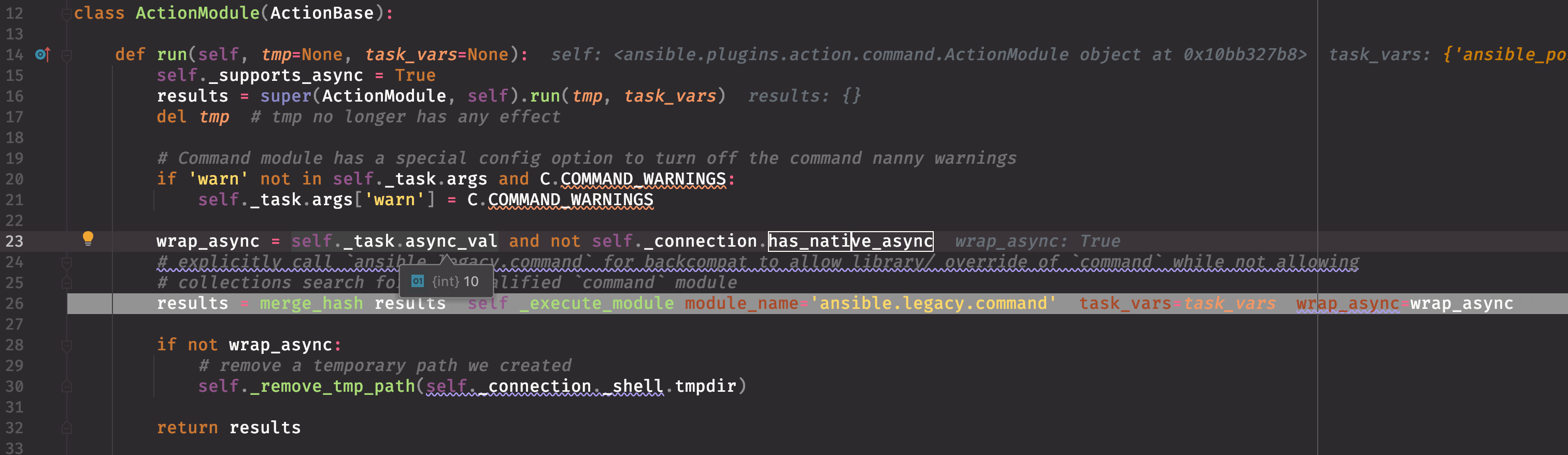
此处通过判断 task 的 async 的值来判断是否进行 async 操作,此处为 10,即 playbook 中定义的 async 值为 10。
lib/ansible/plugins/action/__init__.py
_execute_module 方法
- self._make_tmp_path() 创建临时目录
- 获取当前用户的家目录:
echo ~root && sleep 0 - 创建临时目录:
( umask 77 && mkdir -p "echo /root/.ansible/tmp"&& mkdir "echo /root/.ansible/tmp/ansible-tmp-1600668712.8156748-24387-134124052814278" && echo ansible-tmp-1600668712.8156748-24387-134124052814278="echo /root/.ansible/tmp/ansible-tmp-1600668712.8156748-24387-134124052814278" ) && sleep 0至此,完成临时目录的创建。

- 拷贝
AnsiballZ_command.py到/root/.ansible/tmp/ansible-tmp-1600668712.8156748-24387-134124052814278/目录下。其功能如前文所述 wiki: #3685
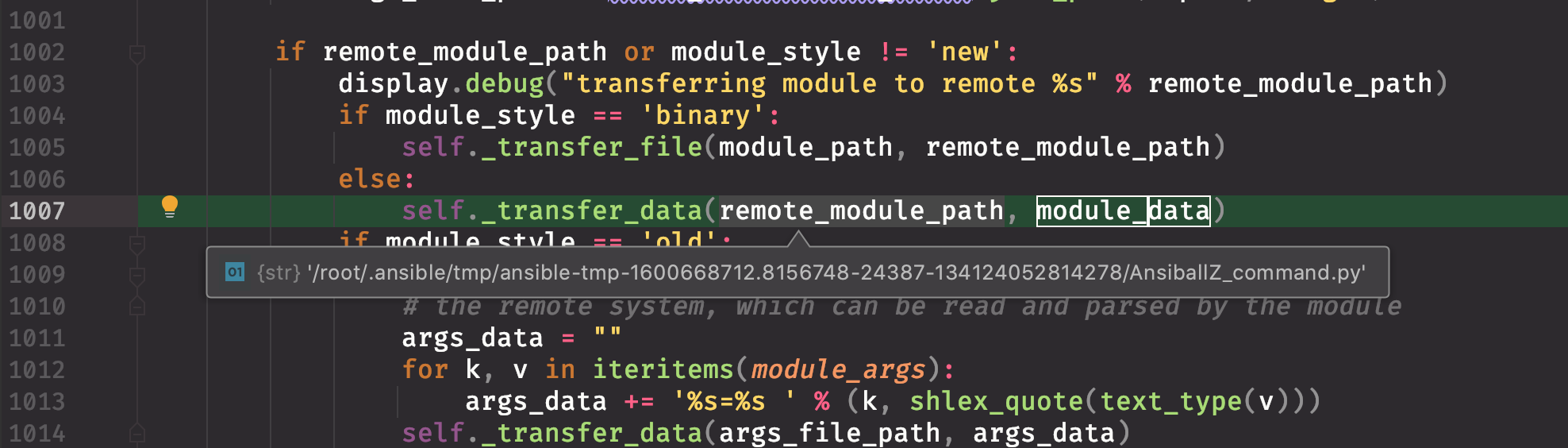
- 定时轮训逻辑(这是相比 #3685 多出来的流程) 这里多出来的逻辑是拷贝了一个 async_wrapper.py 文件到目标主机

其中 async_limit 为 task 中定义的 async 值,async_jid 为随机数。
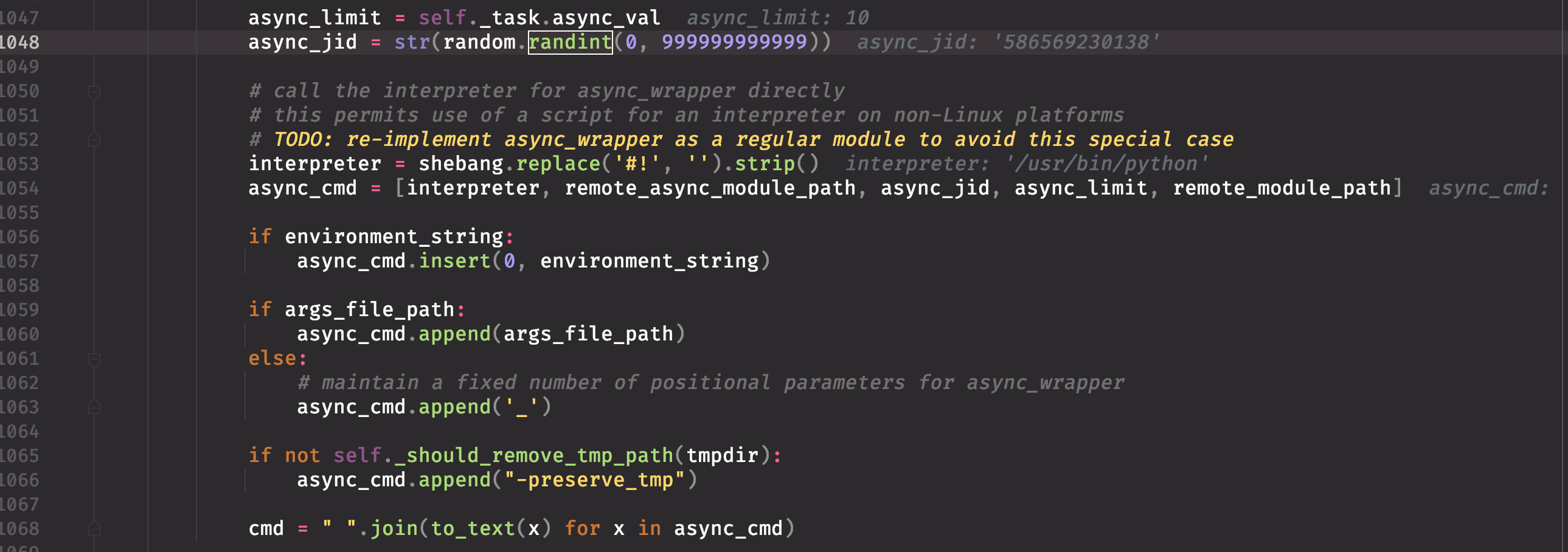
接着生成了一个 async_cmd,也就是通过 ssh 命令,调用目标主机上的 async_wrapper.py 文件的命令。最终生成的命令为:
'ANSIBLE_ASYNC_DIR=\'~/.ansible_async\' /usr/bin/python /root/.ansible/tmp/ansible-tmp-1600668712.8156748-24387-134124052814278/async_wrapper.py 586569230138 10 /root/.ansible/tmp/ansible-tmp-1600668712.8156748-24387-134124052814278/AnsiballZ_command.py _'
其中 async_wrapper.py 文件的内容如下:
#!/usr/bin/python
# -*- coding: utf-8 -*-
_ANSIBALLZ_WRAPPER = True # For test-module.py script to tell this is a ANSIBALLZ_WRAPPER
def _ansiballz_main():

    import os
    import os.path
    import sys
    import __main__
    scriptdir = None
    try:
        scriptdir = os.path.dirname(os.path.realpath(__main__.__file__))
    except (AttributeError, OSError):
        pass
    excludes = set(('', '.', scriptdir))
    sys.path = [p for p in sys.path if p not in excludes]
    import base64
    import runpy
    import shutil
    import tempfile
    import zipfile
    if sys.version_info < (3,):
        PY3 = False
    else:
        PY3 = True
    ZIPDATA = """omitted..."""
    def invoke_module(modlib_path, temp_path, json_params):
        z = zipfile.ZipFile(modlib_path, mode='a')
        sitecustomize = u'import sys\nsys.path.insert(0,"%s")\n' %  modlib_path
        sitecustomize = sitecustomize.encode('utf-8')
        zinfo = zipfile.ZipInfo()
        zinfo.filename = 'sitecustomize.py'
        zinfo.date_time = ( 2020, 9, 21, 6, 26, 19)
        z.writestr(zinfo, sitecustomize)
        z.close()
        sys.path.insert(0, modlib_path)
        from ansible.module_utils import basic
        basic._ANSIBLE_ARGS = json_params

        runpy.run_module(mod_name='ansible.modules.async_wrapper', init_globals=None, run_name='__main__', alter_sys=True)
        print('{"msg": "New-style module did not handle its own exit", "failed": true}')
        sys.exit(1)
    def debug(command, zipped_mod, json_params):
        basedir = os.path.join(os.path.abspath(os.path.dirname(__file__)), 'debug_dir')
        args_path = os.path.join(basedir, 'args')
        if command == 'explode':
            z = zipfile.ZipFile(zipped_mod)
            for filename in z.namelist():
                if filename.startswith('/'):
                    raise Exception('Something wrong with this module zip file: should not contain absolute paths')
                dest_filename = os.path.join(basedir, filename)
                if dest_filename.endswith(os.path.sep) and not os.path.exists(dest_filename):
                    os.makedirs(dest_filename)
                else:
                    directory = os.path.dirname(dest_filename)
                    if not os.path.exists(directory):
                        os.makedirs(directory)
                    f = open(dest_filename, 'wb')
                    f.write(z.read(filename))
                    f.close()
            f = open(args_path, 'wb')
            f.write(json_params)
            f.close()
            print('Module expanded into:')
            print('%s' % basedir)
            exitcode = 0
        elif command == 'execute':
            sys.path.insert(0, basedir)
            with open(args_path, 'rb') as f:
                json_params = f.read()
            from ansible.module_utils import basic
            basic._ANSIBLE_ARGS = json_params
            runpy.run_module(mod_name='ansible.modules.async_wrapper', init_globals=None, run_name='__main__', alter_sys=True)
            print('{"msg": "New-style module did not handle its own exit", "failed": true}')
            sys.exit(1)
        else:
            print('WARNING: Unknown debug command.  Doing nothing.')
            exitcode = 0
        return exitcode
    ANSIBALLZ_PARAMS = '{"ANSIBLE_MODULE_ARGS": {}}'
    if PY3:
        ANSIBALLZ_PARAMS = ANSIBALLZ_PARAMS.encode('utf-8')
    try:
        temp_path = tempfile.mkdtemp(prefix='ansible_ansible.legacy.async_wrapper_payload_')
        zipped_mod = os.path.join(temp_path, 'ansible_ansible.legacy.async_wrapper_payload.zip')
        with open(zipped_mod, 'wb') as modlib:
            modlib.write(base64.b64decode(ZIPDATA))
        if len(sys.argv) == 2:
            exitcode = debug(sys.argv[1], zipped_mod, ANSIBALLZ_PARAMS)
        else:
            invoke_module(zipped_mod, temp_path, ANSIBALLZ_PARAMS)
    finally:
        try:
            shutil.rmtree(temp_path)
        except (NameError, OSError):
            pass
    sys.exit(exitcode)
if __name__ == '__main__':
    _ansiballz_main()
与 AnsiballZ_command.py 中的逻辑类似,最终执行的代码来自 ZIP_DATA 中的数据,此处为 ansible.modules.async_wrapper 中的 main 函数,同理,此函数也可以在 ansible 的源代码中找到,其内容如下:
➜  tree ansible
.
├── __init__.py
├── module_utils
│   ├── __init__.py
│   ├── _text.py
│   ├── basic.py
│   ├── common
│   │   ├── __init__.py
│   │   ├── _collections_compat.py
│   │   ├── _json_compat.py
│   │   ├── _utils.py
│   │   ├── collections.py
│   │   ├── file.py
│   │   ├── parameters.py
│   │   ├── process.py
│   │   ├── sys_info.py
│   │   ├── text
│   │   │   ├── __init__.py
│   │   │   ├── converters.py
│   │   │   └── formatters.py
│   │   ├── validation.py
│   │   └── warnings.py
│   ├── compat
│   │   ├── __init__.py
│   │   ├── _selectors2.py
│   │   └── selectors.py
│   ├── distro
│   │   ├── __init__.py
│   │   └── _distro.py
│   ├── parsing
│   │   ├── __init__.py
│   │   └── convert_bool.py
│   ├── pycompat24.py
│   └── six
│       └── __init__.py
└── modules
    ├── __init__.py
    └── async_wrapper.py
8 directories, 29 files
其中 async_wrapper.py 在 ansible 中的位置为:lib/ansible/modules/async_wrapper.py。
- 实际执行任务。这里执行的其实是 async_wrapper.py,通过 async_wrapper.py 来调用 AnsiballZ_command.py。

此处总共分成两个步骤:
- 加权限:
chmod u+x ~/.ansible/tmp/ansible-tmp-1600668712.8156748-24387-134124052814278/ ...AnsiballZ_command.py ...async_wrapper.py && sleep 0(路径有省略) - 执行 async_wrapper.py:
python ...async_wrapper.py 586569230138 10 ...AnsiballZ_command.py _ && sleep 0(路径有省略)
承接第3小点,此处最终执行的是 ansible/modules/async_wrapper.py 的代码逻辑
ansible/modules/async_wrapper.py
- 取出传入的参数,即 async、command.py 等
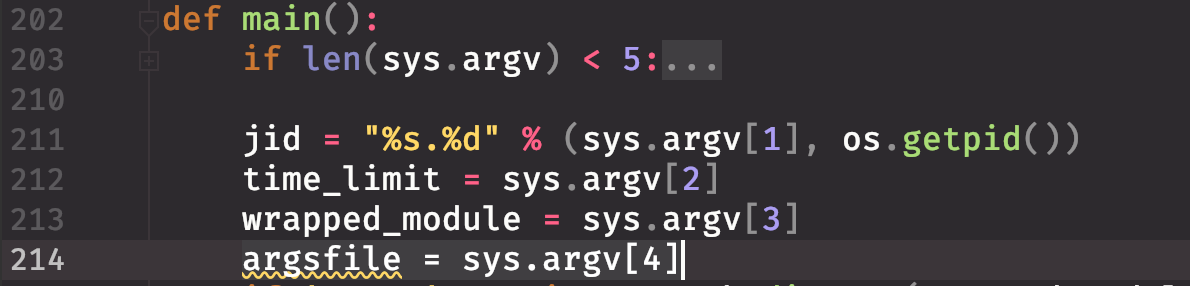
- 确定实际要执行的命令(业务命令,也就是对用户来说,相在目标机上执行的命令)
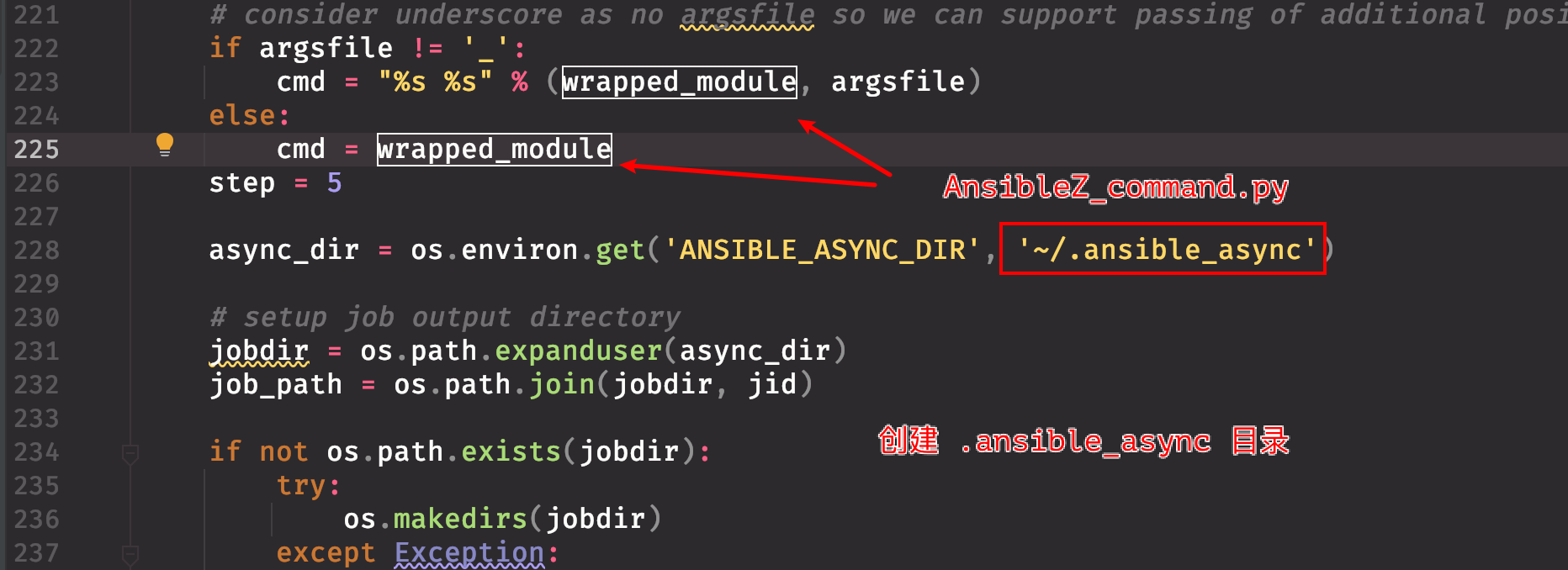
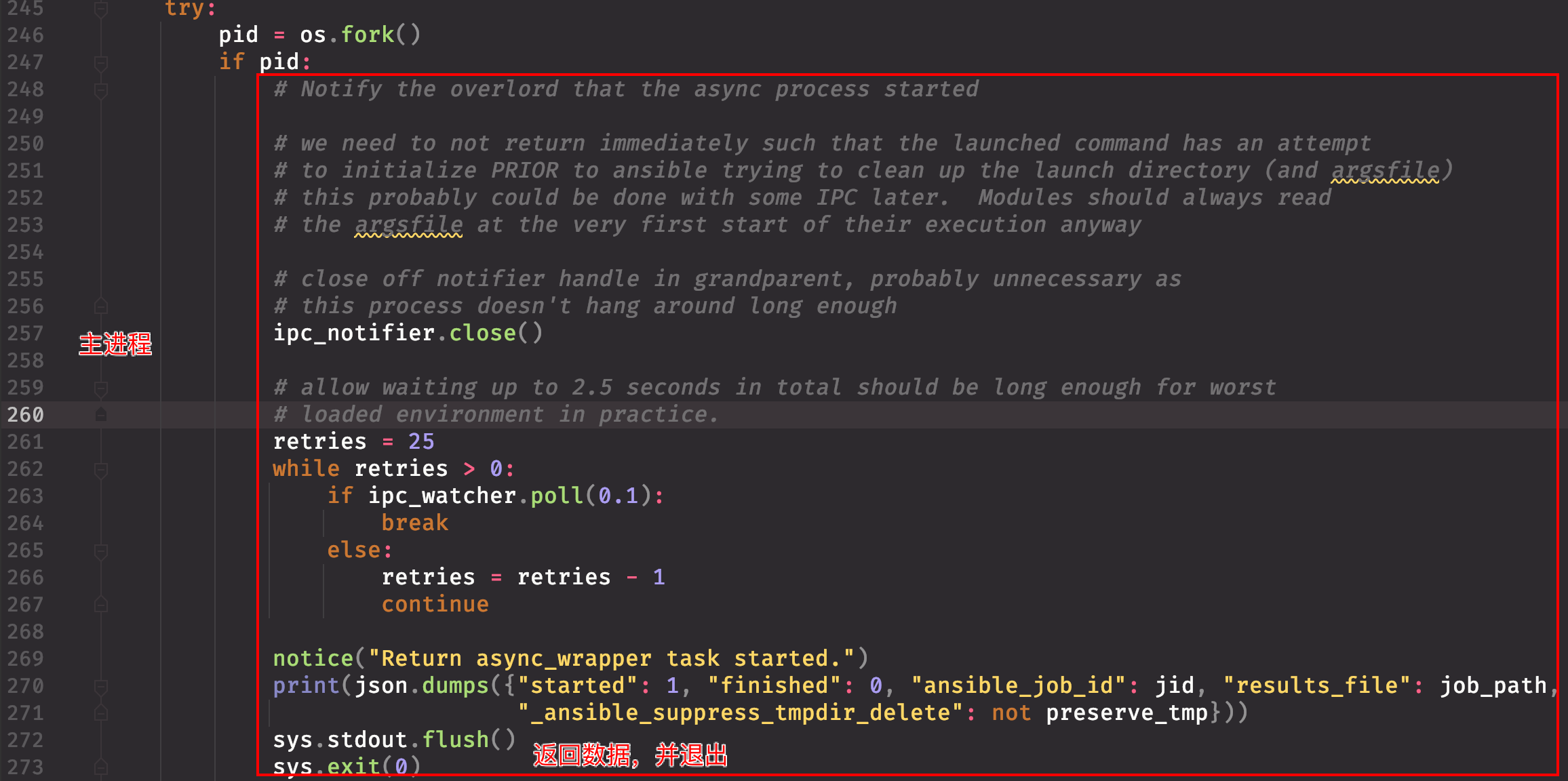
- 通过 os.fork() 剥离主进程与子进程,子进程执行 XXX_command.py,主进程返回结束。此处涉及大量的进程间通信(IPC),代码逻辑有点绕,但是有如下几点可以确认:
- 父(主)进程提前返回,也就是 ssh 命令执行完毕。
- 子进程在父进程退出后,变成孤儿进程,然后通过
daemonize_self()函数,将自己变成一个脱离父进程的新进程。
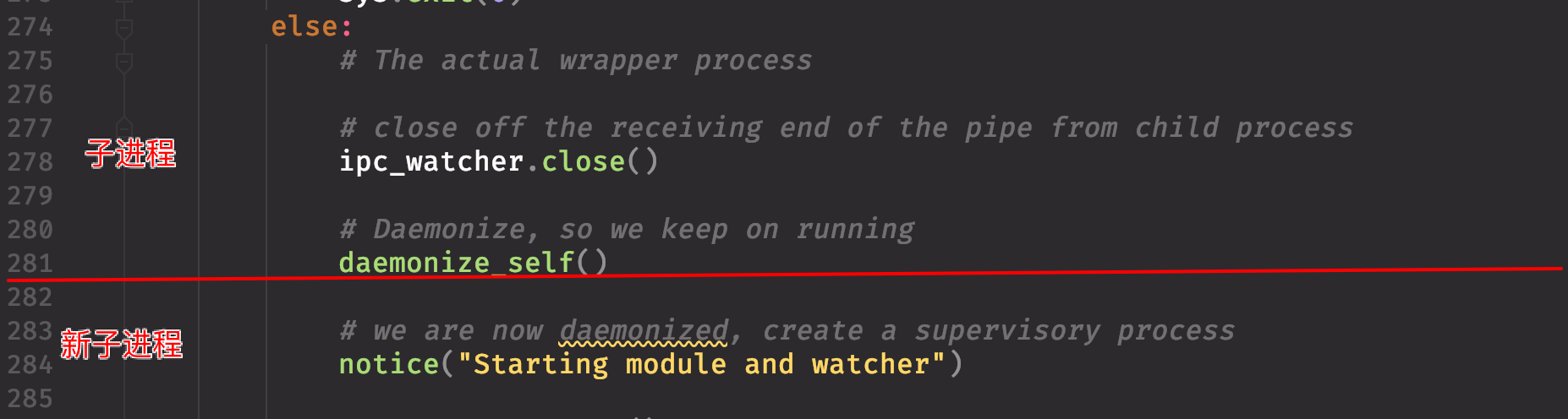
- 新进程会再次 fork,创建一个新子进程,并在新子进程中执行 XXX_command.py ,新进程会一直等待新子进程执行完毕。
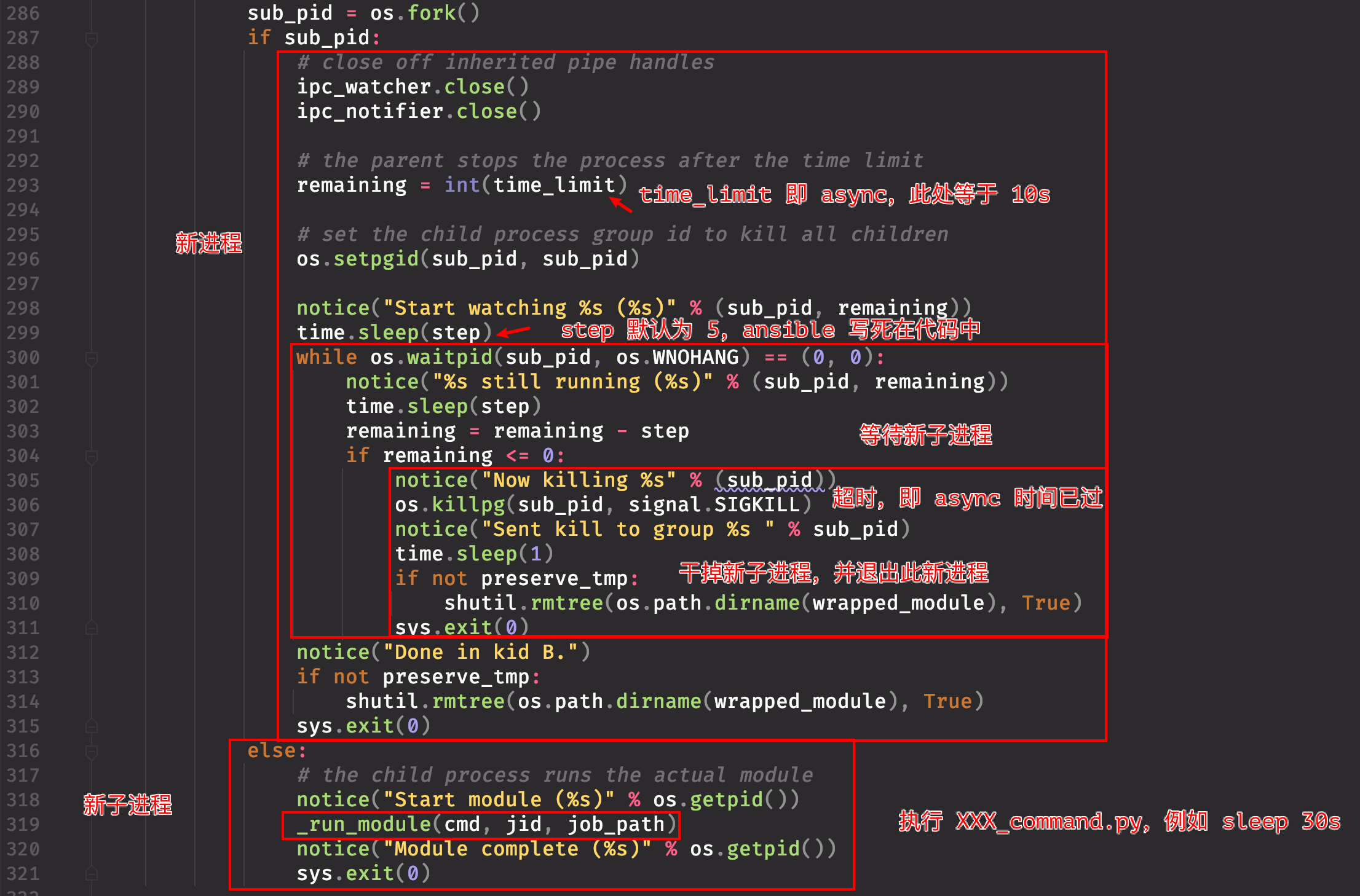
经过上述步骤,ssh 命令已返回。
轮训执行结果
执行完上述流程后,会返回一个 result,内容如下:
{
    "started": 1,
    "finished": 0,
    "results_file": "/root/.ansible_async/732064027558.2514",
    "ansible_job_id": "732064027558.2514",
    "_ansible_parsed": true,
    "changed": true,
    "_ansible_no_log": false
}
可以看出,结果是存放在被控端的某个目录下,并在 lib/ansible/executor/task_executor.py 中,通过对 task 中的 async 和 poll 值的判断,来决定是否进行结果轮询:

轮训的流程与执行一条 ansible 命令类似,详见 #3685 ,此处不再赘述,不同的地方在于:
上传的文件是 AnsiballZ_async_status.py
通过 ssh 开始执行的文件是 AnsiballZ_async_status.py,最终执行的是: lib/ansible/modules/async_status.py。
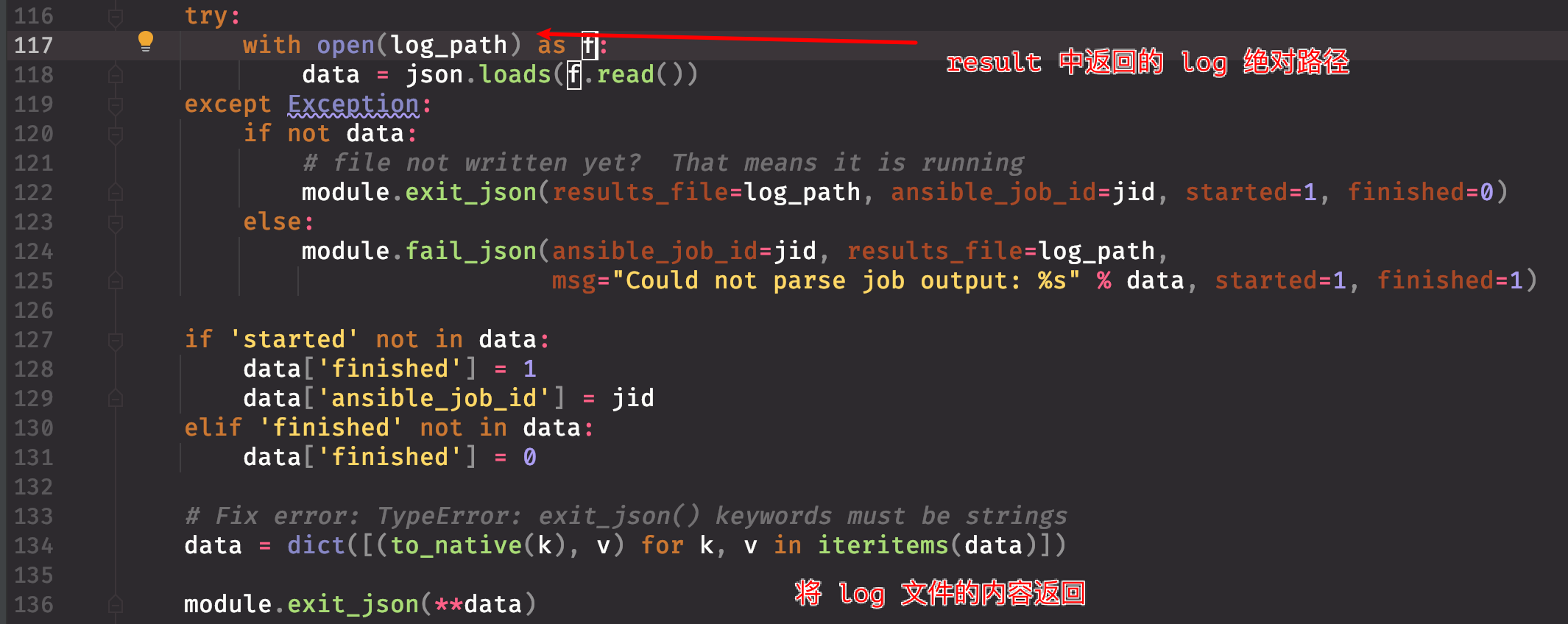
拿到被控机上面的 task log 后,会对 task 的执行状态进行判断:
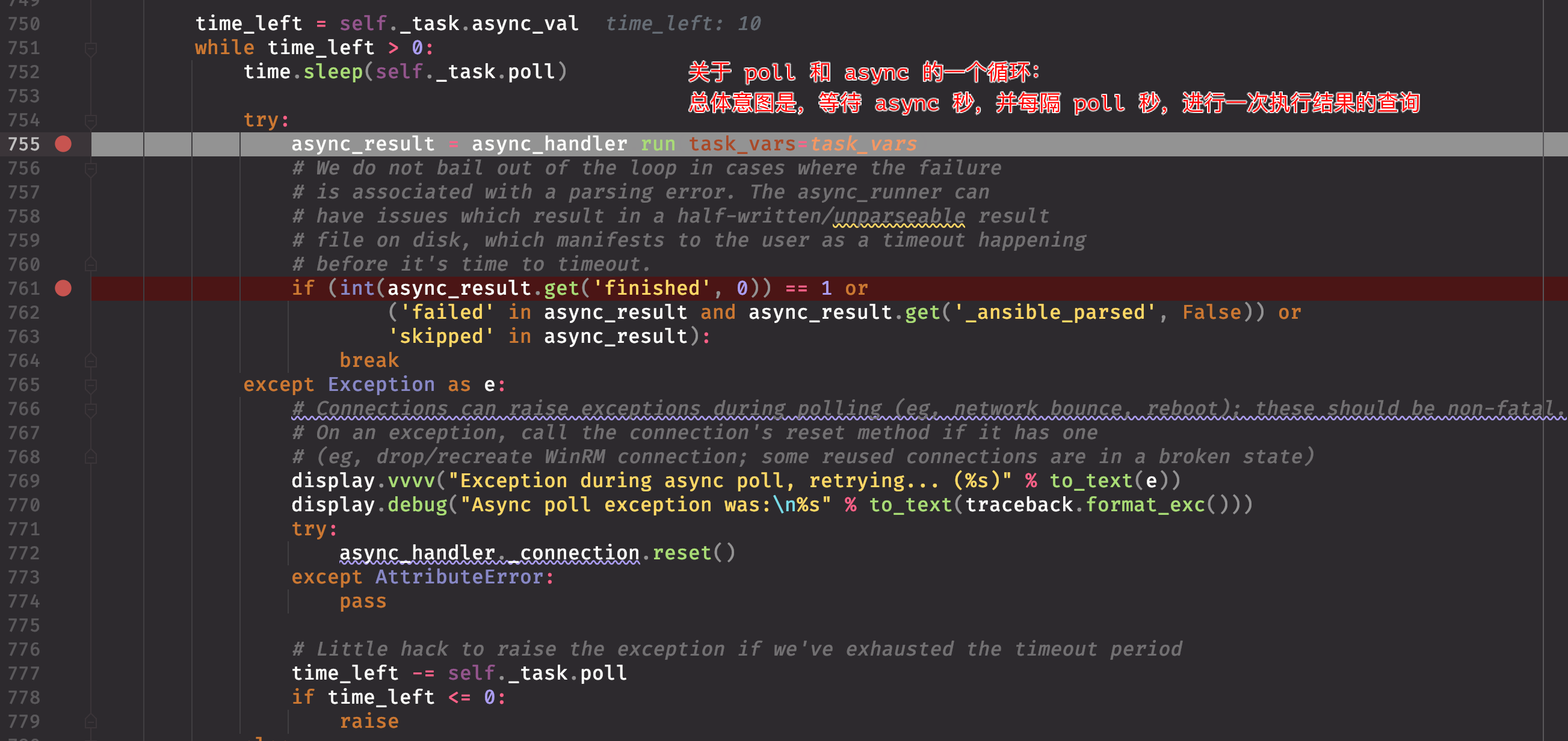
如果在 async 秒内,没有完成 task,此 task 将直接返回超时;

不过从此处来看,当 task 执行完毕后,可能还存在主控端去被控端轮询 task 的情况。
