Java多线程系列(0)基础概念
废话就不多说了,直接上总结吧线程的状态(API文档翻译)看了很多网上的那些关于Java中线程的状态转换图,但是我觉得比较靠谱的还是根据源代码中所定义的状态整出来的状态图。也是看到别人的指点吧。源代码位置:public static enum Thread.StateA thread can be i
废话就不多说了,直接上总结吧
线程的状态(API文档翻译)
看了很多网上的那些关于Java中线程的状态转换图,但是我觉得比较靠谱的还是根据源代码中所定义的状态整出来的状态图。也是看到别人的指点吧。
源代码位置:public static enum Thread.State
A thread can be in only one state at a given point in time.These states are virtual machine states which do not reflect any operating system thread states. A thread can be in one of the following thread states: 在某个特定的时间点上,一个线程只能处于某一个特定的状态。这些状态是指JVM中的状态,不是指任何操作系统中的线程概念(所以这可能意味着这里所讲的线程状态只是Java中的线程状态)。线程的状态如下:
| 状态 | 描述 |
|---|---|
NEW |
A thread that has not yet started is in this state. 没有调用过 start()方法的线程。或者说刚new出来的 |
RUNNABLE |
A thread executing in the Java virtual machine but it may be waiting for other resources from the operating system such as processor. 正在虚拟机中运行,但可能在等待某个资源,如处理器。 |
BLOCKED |
A thread in the blocked state is waiting for a monitor lock to enter a synchronized block/method or reenter a synchronized block/method after calling Object.wait.等待锁的释放以进入 synchronized代码块/方法,或在调用wait()后再次进入synchronized代码块/方法。 |
WAITING |
A thread that is waiting indefinitely for another thread to perform a particular action is in this state. 无限期地等待其他的线程执行某个特定的动作,以继续后续操作 |
TIMED_WAITING |
A thread that is waiting for another thread to perform an action for up to a specified waiting time is in this state. 等待某个线程执行一个操作到某个确定的时间 |
TERMINATED |
A thread that has exited is in this state. 已退出 |
关于TIMED_WAITING和WAITING(API文档中对其说明的翻译):
1.一个处于WAITING状态的线程,可以在调用了下面列表中的方法后进入:
Object.waitwith no timeoutThread.joinwith no timeoutLockSupport.park
处于WAITING状态的线程在等待着其他线程的某个特定的动作以继续执行。例如,当一个线程调用了 Object.wait()后,此线程便等待着其它线程调用Object.notify()/Object.notifyAll()(前后为同一个对象) ;当一个线程调用了Thread.join()后,此线程便在等待 join()方法所在对象(线程) 的终结,以继续后续操作。
2.处于TIMED_WAITING状态的线程,与WAITING状态类似,只是多了一个时间限制。可以在调用了下面的方法后进入:
Thread.sleepObject.waitwith timeoutThread.joinwith timeoutLockSupport.parkNanosLockSupport.parkUntil
状态转换图
join()的源码分析
// 不带参数的join实际上运行的是一个传参数0的join()
public final void join() throws InterruptedException {
    join(0);
}
// 带一个参数的join
public final synchronized void join(long millis) throws InterruptedException {
    long base = System.currentTimeMillis();
    long now = 0;

    if (millis < 0) {
        throw new IllegalArgumentException("timeout value is negative");
    }
    // 对0时特殊处理
    if (millis == 0) {
        while (isAlive()) {//此判断的对象是当前对象,也就是另外一个线程
            wait(0);// 堵塞当前运行所处的线程
        }
    // 否则若超出了规定事件,那么将跳出循环,也就是不在阻塞
    } else {
        while (isAlive()) {
            long delay = millis - now;
            if (delay <= 0) {
                break;
            }
            wait(delay);
            now = System.currentTimeMillis() - base;
        }
    }
}
对于其中的wait(0),锁是自身,所以就有一个问题,那就是何时会调用notify/notifyAll,让当前运行线程从堵塞中恢复出来,继续运行?因为锁是本身对象,这个对象也是一个线程,等这个线程运行完毕后,除了它自己,就没有看到有调用notify/notifyAll的语句。所以想了半天,可能是线程执行完毕后,会有一个回调之类的来执行同样的功能,或者是直接可以让跳出的功能吧。带着疑问看到了join(int)的注释,瞬间就明白了:
As a thread terminates the this.notifyAll method is invoked.
也就是说,线程结束后,会调用this.nofityAll()。
对于为什么要在while循环中调用wait(),这是一个套路,在API中该方法的注释上面,我们可以找到相关的说明:
线程可能被除notify、interrupt、超时之外的伪唤醒唤醒。这种情况,在实际中,发生几率不大。我们需要等到其满足条件后,才不阻塞,如果不满足条件,继续阻塞。wait()要写在循环中,如下:
synchronized (obj) {
    while (<condition does not hold>)
       obj.wait(timeout);
    ... // Perform action appropriate to condition
}
JLS, 17.2.1 Wait

没太理解啥时候会抛出IllegalMonitorStateException。自己写了一个,就抛出这个异常了。
异常源代码的注释: Thrown to indicate that a thread has attempted to wait on an object's monitor or to notify other threads waiting on an object's monitor without owning the specified monitor.
获得这个对象的锁是什么意思?
可参考 JSL,14.19
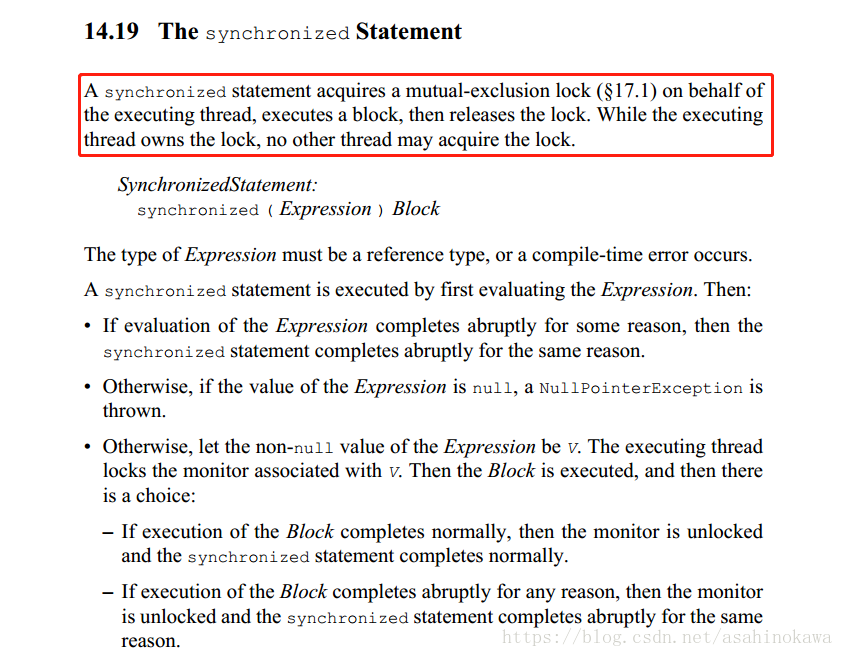
看了这个解释越来越迷糊。既然使用synchronized就可以使得其他线程阻塞住,且其中的代码块可以保证只有一个线程在执行,那么使用wait()的意义到底在哪里呢?
关于synchronized关键字
有两个场景,一种是做为其所修饰的方法,另一种则是作为一个代码块。在JLS,8.4.3.6 synchronized Methods和JLS,14.19 The synchronized Statement中有相应的描述。所以下面来看其所修饰的方法是怎么一回事:
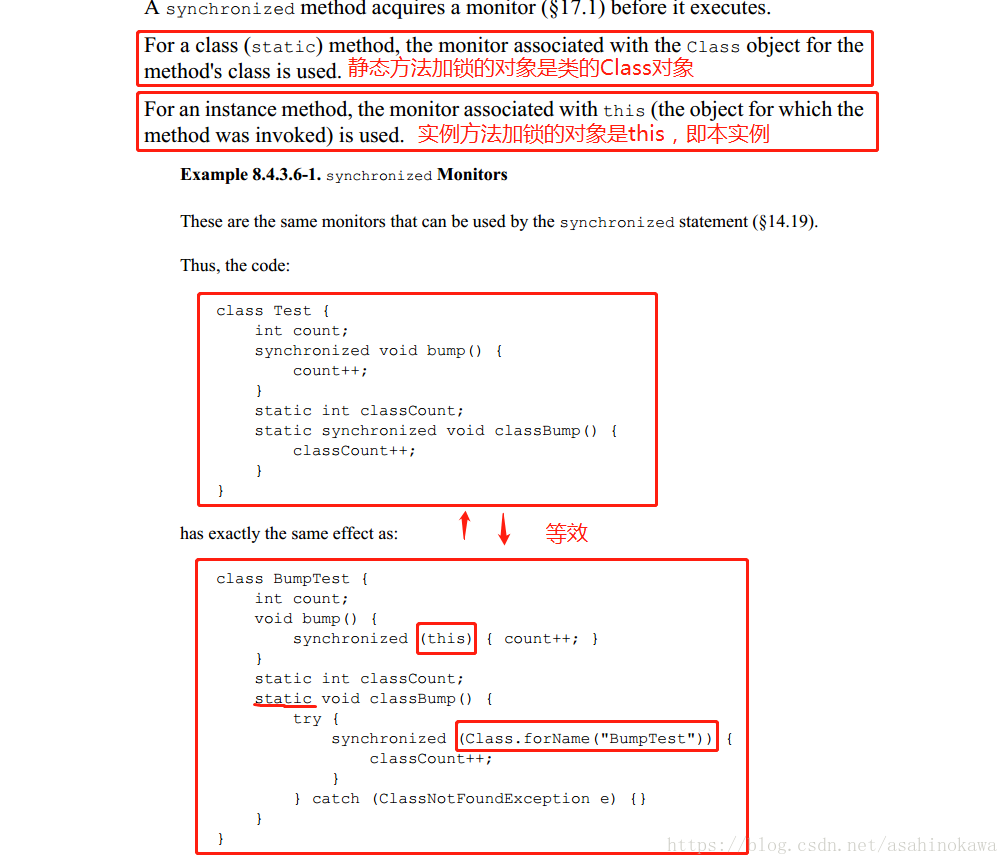
开头的那段描述说,synchronized方法在执行前会获得一个锁。这个锁是哪来的,以及是谁的?后面的两段就已经给出了回答。按照对其的理解,尝试了将其效果体现出来,没有任何同步的代码如下:
package basic.multithread;

public class TestSynchronized {
    public static void main(String[] args) {
        SubClass sc1 = new SubClass(1);
        SubClass sc2 = new SubClass(2);
		// 在第一个线程中,是使用sc1的sayHello方法
        new Thread(new Runnable() {
            @Override
            public void run() {
                sc1.sayHello("thread 1");
            }
        }).start();
		// 在第二个线程中使用sc2的sayHello方法
        new Thread(new Runnable() {
            @Override
            public void run() {
                sc2.sayHello("thread 2");
            }
        }).start();
    }

    private static class SubClass{
        private int index;

        public SubClass(int index) {
            this.index = index;
        }
		// 如果在这个方法上直接加锁,能够达到依次输出吗?
        public void sayHello(String addedInfo){
            for (int i = 0; i < 5; i++) {
                System.out.println("Instance " + index + " say Hello from " + addedInfo);
                try {
                    Thread.sleep(500);
                } catch (InterruptedException e) {
                    e.printStackTrace();
                }
            }
        }
    }
}
/**某一次的输出
Instance 1 say Hello from thread 1
Instance 2 say Hello from thread 2
Instance 2 say Hello from thread 2
Instance 1 say Hello from thread 1
Instance 2 say Hello from thread 2
Instance 1 say Hello from thread 1
Instance 2 say Hello from thread 2
Instance 1 say Hello from thread 1
Instance 2 say Hello from thread 2
Instance 1 say Hello from thread 1
*/
按照对其的理解,可以猜测如果只是在SubClass.sayHello()方法加上synchronized是不能达到让线程1执行完毕后再执行线程2的。为什么呢?因为在这两个线程中,执行sayHello()方法的实例不是同一个,也就是说,不是同一把锁,也就没有阻塞的效果。要怎么改?换成同一个实例或者将sayHello()中的代码用synchronized代码块包裹住,其中的参数填写SubClass.class,即可达到让线程1或线程2执行完毕后再执行另外一个线程的效果。当然也可以直接用join,这里只是验证一下对synchronized关键字的理解。
先看实际操作中,只添加关键字的做法:
// 接上述代码,其余不变,只加上synchronized关键字
public synchronized void sayHello(String addedInfo){
    for (int i = 0; i < 5; i++) {
        System.out.println("Instance " + index + " say Hello from " + addedInfo);
        try {
            Thread.sleep(500);
        } catch (InterruptedException e) {
            e.printStackTrace();
        }
    }
}
/**运行结果:
Instance 1 say Hello from thread 1
Instance 2 say Hello from thread 2
Instance 1 say Hello from thread 1
Instance 2 say Hello from thread 2
Instance 2 say Hello from thread 2
Instance 1 say Hello from thread 1
Instance 1 say Hello from thread 1
Instance 2 say Hello from thread 2
Instance 1 say Hello from thread 1
Instance 2 say Hello from thread 2
*/
在加上关键字后(接上面的代码),调用同一个实例的sayHello()方法:
// 将sc2改成了sc1,即使用同一个实例
public static void main(String[] args) {
    SubClass sc1 = new SubClass(1);
    SubClass sc2 = new SubClass(2);

    new Thread(new Runnable() {
        @Override
        public void run() {
            sc1.sayHello("thread 1");
        }
    }).start();

    new Thread(new Runnable() {
        @Override
        public void run() {
	        // 修改点在这里
            sc1.sayHello("thread 2");
        }
    }).start();
}
/*运行结果:
Instance 1 say Hello from thread 1
Instance 1 say Hello from thread 1
Instance 1 say Hello from thread 1
Instance 1 say Hello from thread 1
Instance 1 say Hello from thread 1
Instance 1 say Hello from thread 2
Instance 1 say Hello from thread 2
Instance 1 say Hello from thread 2
Instance 1 say Hello from thread 2
Instance 1 say Hello from thread 2
*/
由结果看来,理解是不存在偏差的,不需要负责。还有一种方法,是在原始代码的基础上,将sayHello()方法中的代码,全部包裹在synchronized代码块中,即:
synchronized (SubClass.class) {
	……
}
为什么呢?这得说一下普通类和 Class类 之间的关系。Class类是用来描述一些普通类的信息;每一个普通类都会有一个Class类,不管有多少个实例,不同实例中获取到的相应Class类都是同一个,如下:
SubClass sc1 = new SubClass(1);
SubClass sc2 = new SubClass(2);
System.out.println(sc1.getClass() == sc2.getClass());

经验证效果也是没问题的,结果和代码就不贴了。
关于sleep与yield(JLS, 17.3)
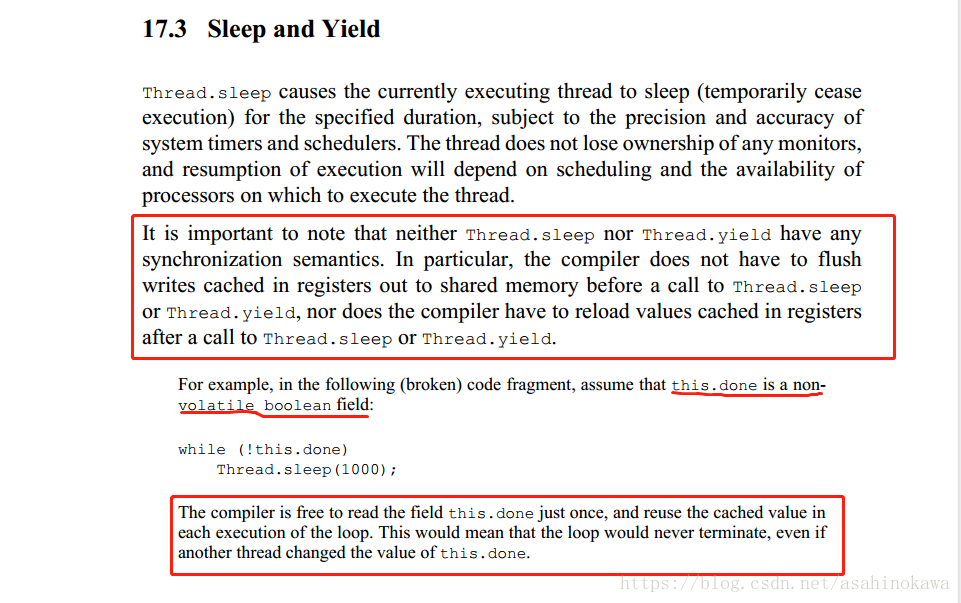
http://www.importnew.com/21136.htmlhttps://www.cnblogs.com/trust-freedom/p/6606594.html
