Spinnaker orca 禁止流水线并发执行的 bug 修复记录
orca 是 Spinnaker 这个开源 CD 服务的心脏模块,负责 CD 流水线的编排、执行,是大脑一般的存在。在 Spinnaker 这个产品中,每次部署操作都可以抽象成一条 流水线,当 流水线 触发时,会产生一次 执行。当该 流水线 已存在一次正在运行中的 执行 时,新的 执行 是否能够执行
orca 是 Spinnaker 这个开源 CD 服务的心脏模块,负责 CD 流水线的编排、执行,是大脑一般的存在。
在 Spinnaker 这个产品中,每次部署操作都可以抽象成一条 流水线,当 流水线 触发时,会产生一次 执行。当该 流水线 已存在一次正在运行中的 执行 时,新的 执行 是否能够执行,取决于 流水线 中的一个配置项:limitConcurrent。当此选项为true时,新的 执行 将进入等待状态,待正在运行的 执行 完成后,才会继续执行;当次选项为false时,新的 执行 将立刻执行
用法 & 产生此问题的前提
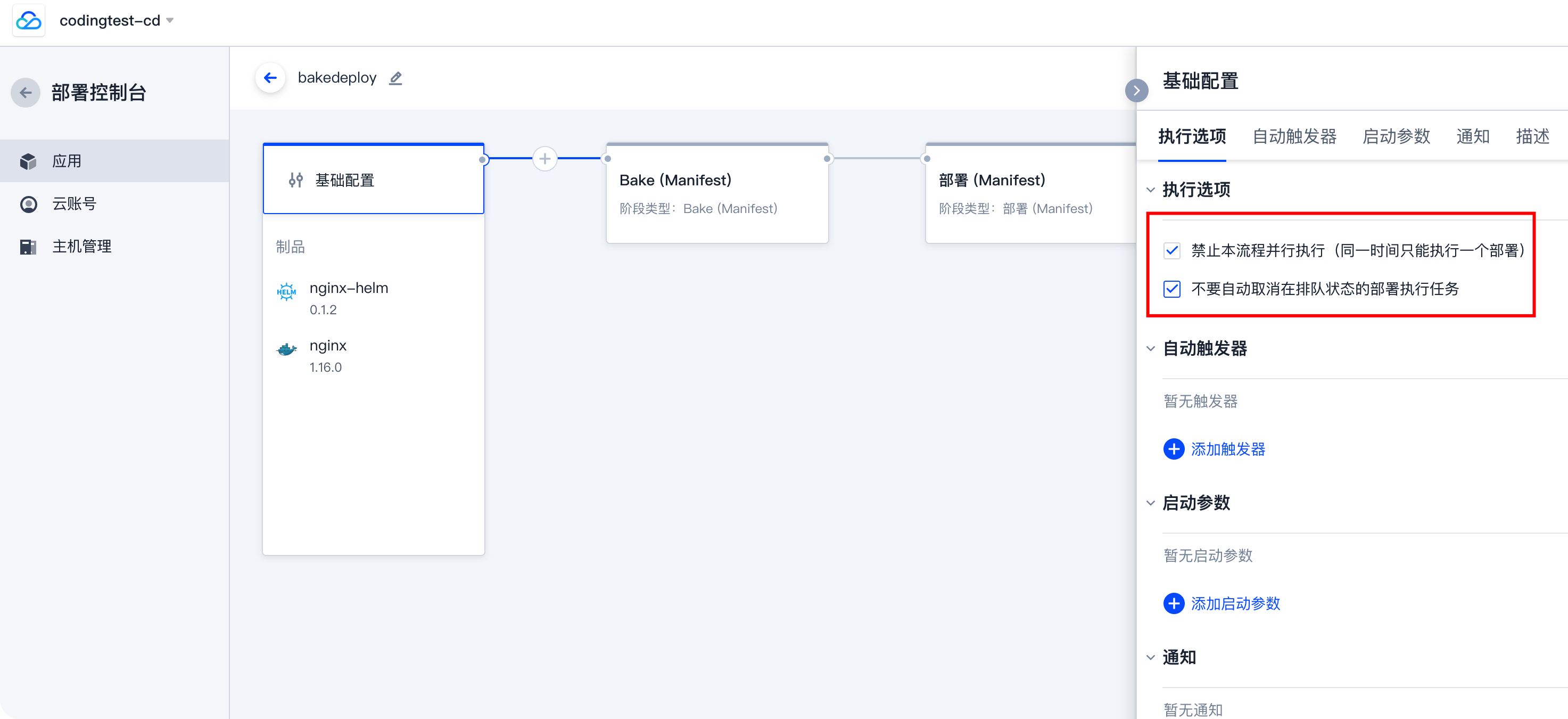
在 coding.net 的部署控制台中,点击应用,进入流水线编辑,在基础配置中:
勾选 禁止本流程并行执行 选项,打钩则意味着同一时间一个流水线只能有一个执行在运行。
勾选 不要自动取消在排队状态的部署执行任务,如果由于勾选 禁止本流程并行执行 而产生的处于排队等待状态的执行,不会被自动取消,直至进入运行状态或手动取消。
现象
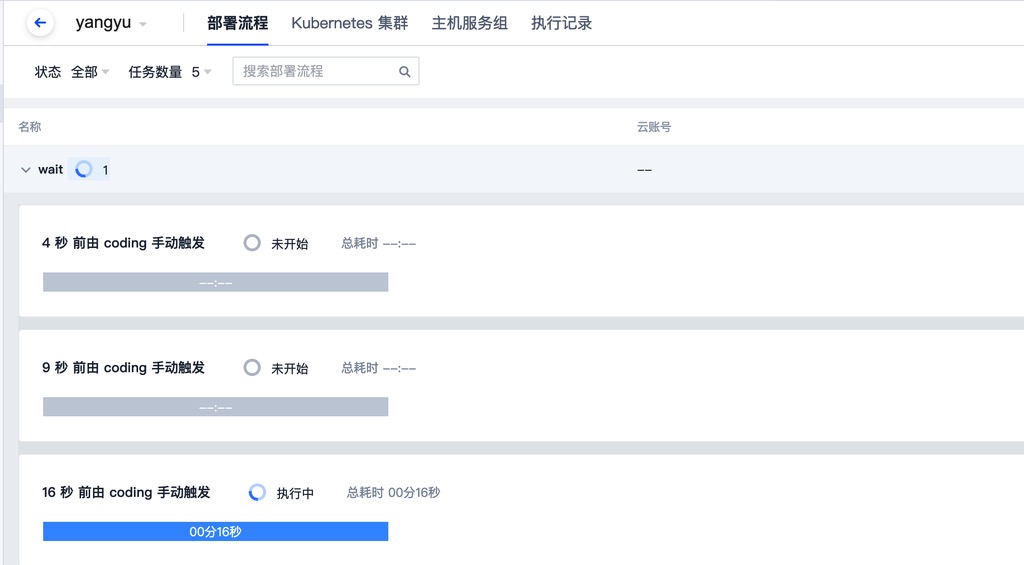
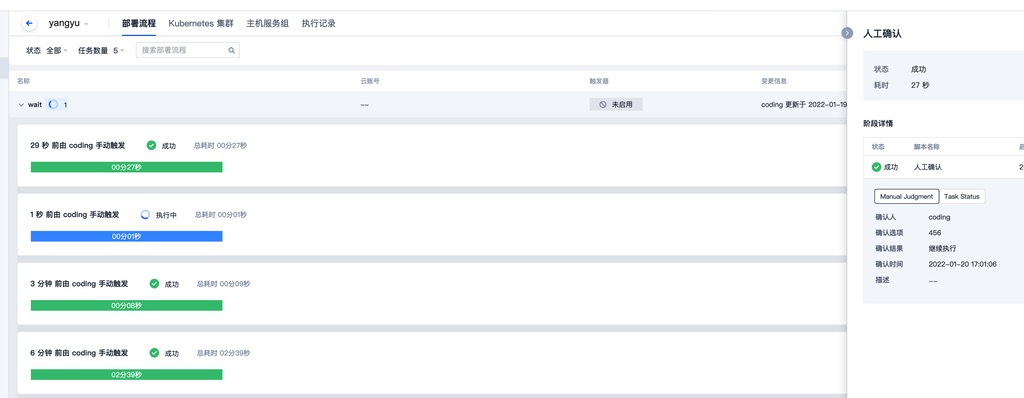
流水线在多次触发后,由于禁止本流程并行执行,所以有一些 执行 进入等待状态
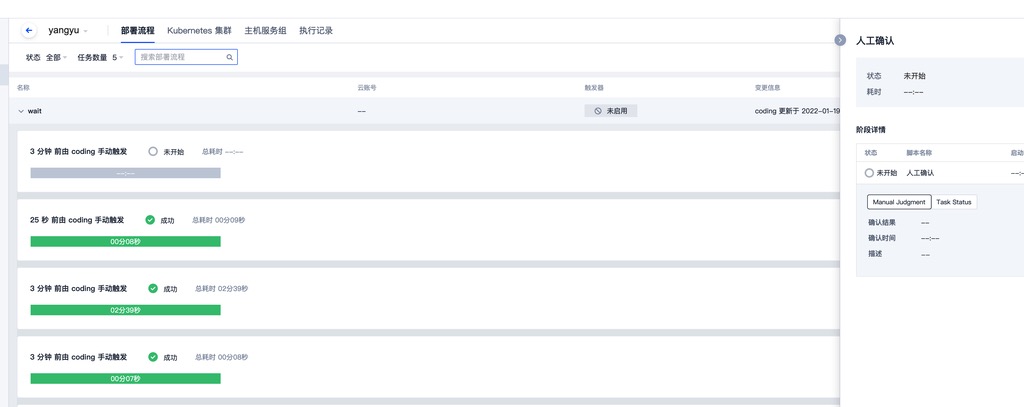
但当正在运行的 执行 跑完后,后触发的 执行 并未进入运行状态,一直处于等待中。
此时如果再触发一次流水线
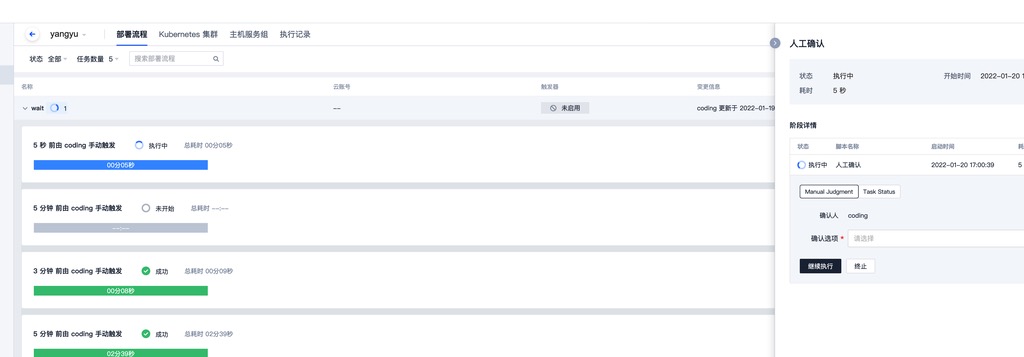
可以看到最新的一次执行完成后,之前处于等待状态的执行进入了运行中的状态。
原因
禁止并发执行依赖于 Redis 中一个叫做 orca.pipeline.queue.${pipeline_config_id} 的 key,它是 list 类型,其中存储的内容(部分)是 StartExecution 类型的 Message,如下:
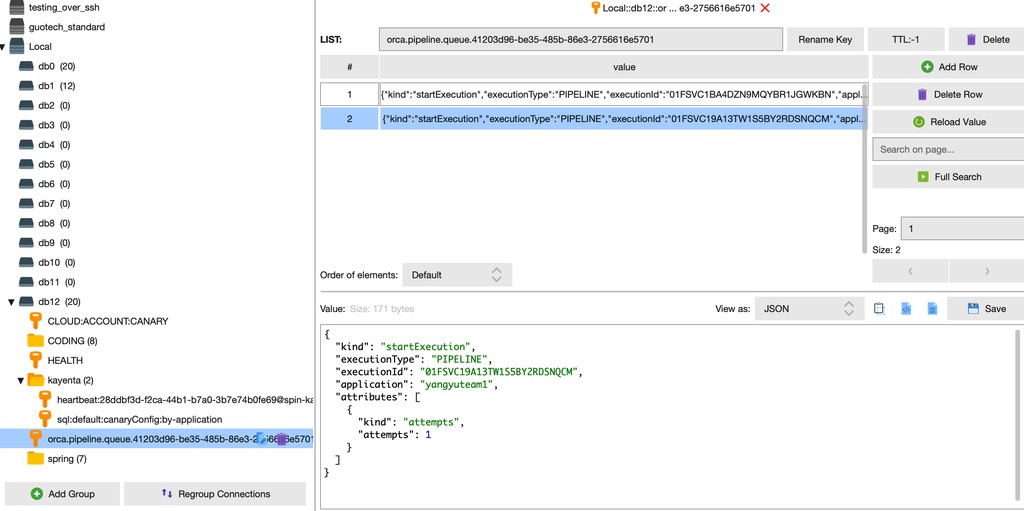
该 list 在 orca 代码中主要由 PendingExecutionService 来操作。主要涉及下面两个操作:
- enqueue(左入,头插)
- popOldest(右出,尾取)
往该 list 存东西的时机只有 2 处:
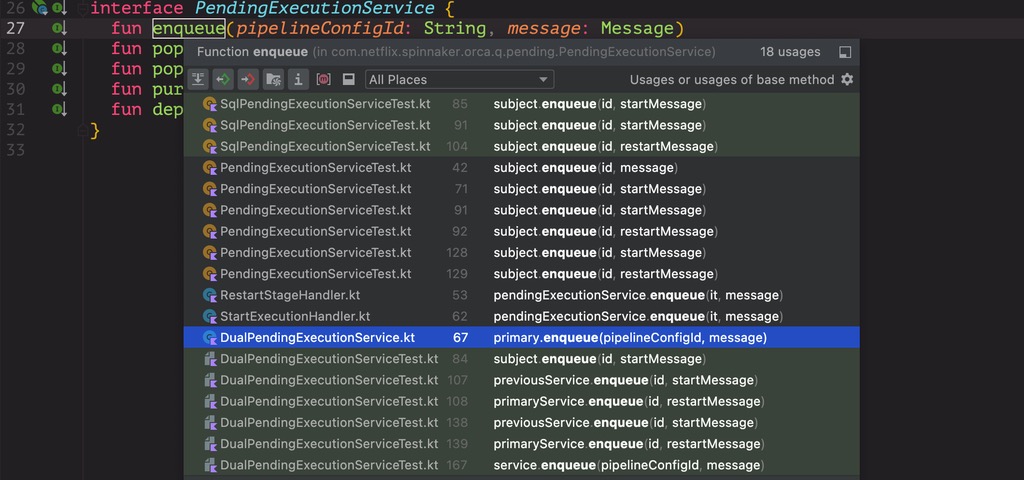
其中在 startExecution 时,会判断 如果禁用并行执行 & 该流水线有在执行的 execution ,如果满足要求,就会安排入队,其中入队的信息是 StartExecution Message。
override fun handle(message: StartExecution) {
  message.withExecution { execution ->
    if (execution.status == NOT_STARTED && !execution.isCanceled) {
      if (execution.shouldQueue()) {
        execution.pipelineConfigId?.let {
          log.info("Queueing {} {} {}", execution.application, execution.name, execution.id)
          pendingExecutionService.enqueue(it, message)
        }
      } else {
        start(execution)
      }
    } else {
      terminate(execution)
    }
  }
}
这里的 enqueue 不会做任何校验,会直接入队。
override fun enqueue(pipelineConfigId: String, message: Message) {
  pool.resource.use { redis ->
    redis.lpush(listName(pipelineConfigId), mapper.writeValueAsString(message))
  }
}
如果存在两个一模一样的 StartExecution 被送到 StartExectionHandler 执行,那么就会入队两次。
往该 list 中取东西的时机只有 1 处,即在 StartWaitingExecutionsHandler 中,如下:
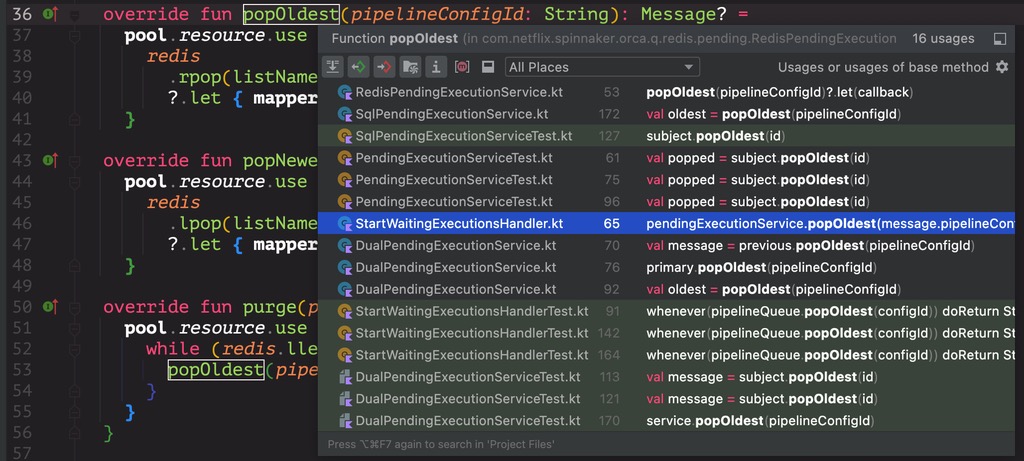
override fun popOldest(pipelineConfigId: String): Message? =
  pool.resource.use { redis ->
    redis
      .rpop(listName(pipelineConfigId))
      ?.let { mapper.readValue(it) }
  }
StartWaitingExecutions Message 被插入 Redis 中的时机主要看 CompleteExecutionHandler 中,如下:
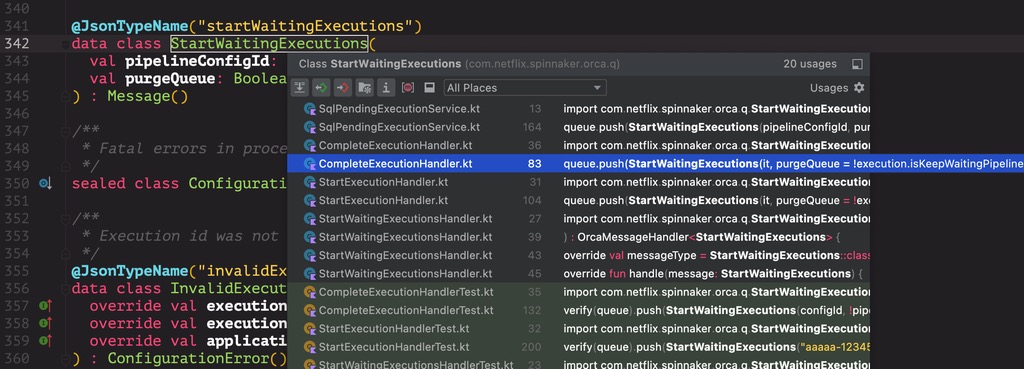
也就是说,当一次 execution 完成后,会尝试执行因并发策略而排队的执行。
至此,完整的逻辑链路梳理完毕。
客户问题日志验证
此次 execution 01FSC58BRQW5GH19AM8D45SN9E,用户等待了 30min 以上,再真正被执行,期间还进行了多次触发。此次 execution 的日志如下:
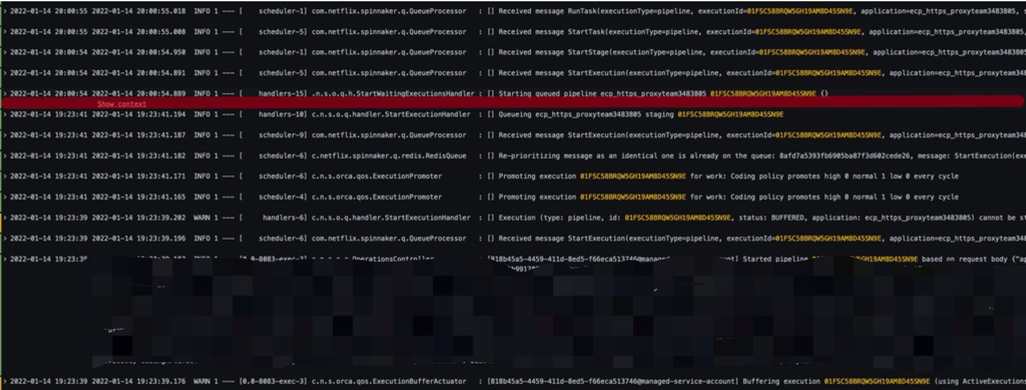
可以看出此次 execution 在 2022-01-14 19:23:39 被提交,但在 2022-01-14 19:23:41 之后,就再也没有任何动静了,直到 2022-01-14 20:00:54 才真正执行。 提交后没有动静,是因为此时有流水线正在执行。可以看到查询数据库获得此时的执行记录如下:
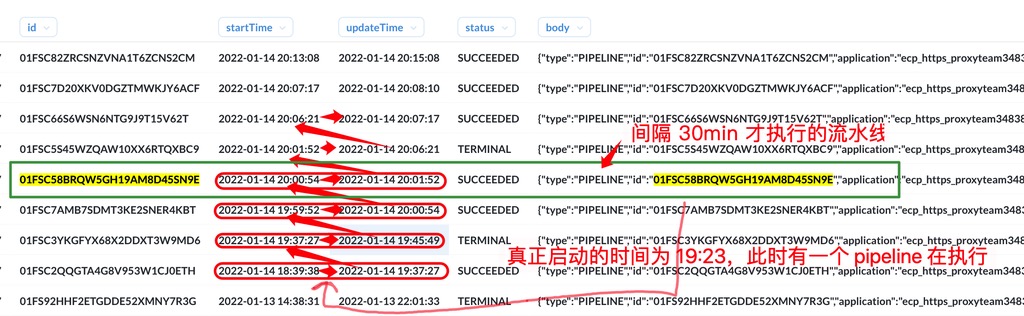
按照前面的逻辑,当正在执行的 execution 完成后,会依次执行排队在中的 execution,直到此次 execution 01FSC58BRQW5GH19AM8D45SN9E。但是可以观察到,在此次 execution 01FSC58BRQW5GH19AM8D45SN9E 的前面,有 3 次 execution,其中出现异常的是第 2 次,即 01FSC3YKGFYX68X2DDXT3W9MD6,它在 2022-01-14 19:45:49 执行完之后,并没有去执行后续队列中的 execution,直到 2022-01-14 19:59:52 开始了一次新的 execution 01FSC7AMB7SDMT3KE2SNER4KBT,注意它是用户在发现很久没有触发后,再一次手动触发的。它触发完成后,才轮到 01FSC58BRQW5GH19AM8D45SN9E 执行,此时已过去 30 min 多。
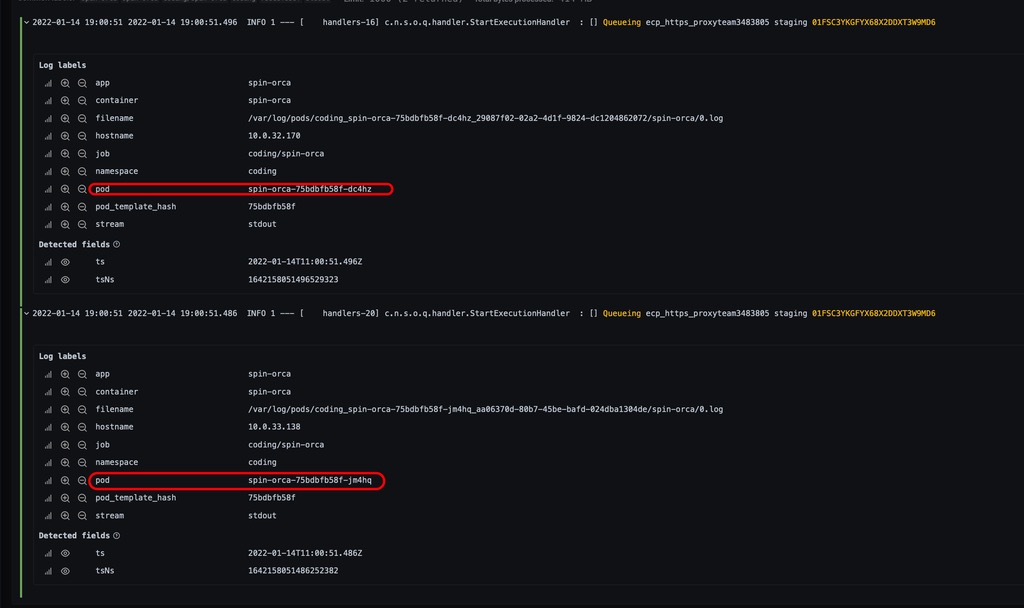
出现问题的 execution 可以通过日志发现他被入队了两次。
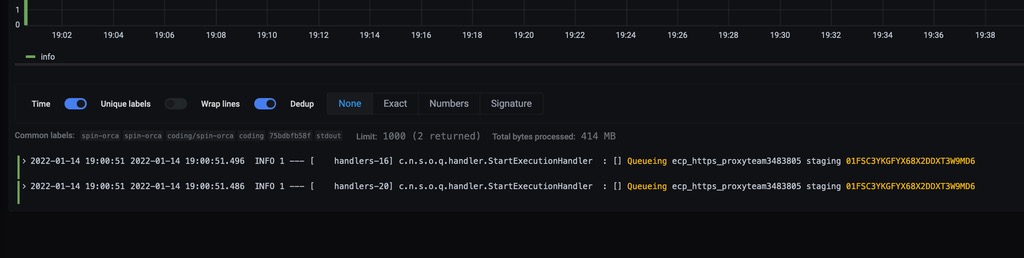
可以从上面的代码中发现,只要是打了 Queueing xxx 日志的地方,那次 execution 一定会入队。所以出现两次,会入队两次。且上面的日志,来自于两个不同的 pod。
为啥不能入队两次
假设入队了两次,就会在获取到第一个消息时,成功/失败执行该 execution,等到该 execution 执行失败后,会再次从该队列中去取,取到了,但是是同一个流水线,且启动流水线时,对流水线的状态时有要求的,正常执行需要 execution.status == NOT_STARTED && !execution.isCanceled 即:
override fun handle(message: StartExecution) {
  message.withExecution { execution ->
    if (execution.status == NOT_STARTED && !execution.isCanceled) {
      if (execution.shouldQueue()) {
        execution.pipelineConfigId?.let {
          log.info("Queueing {} {} {}", execution.application, execution.name, execution.id)
          pendingExecutionService.enqueue(it, message)
        }
      } else {
        start(execution)
      }
    } else {
      terminate(execution)
    }
  }
}
如果不满足状态要求,会执行终止该 execution,即:
private fun terminate(execution: Execution) {
  if (execution.status == CANCELED || execution.isCanceled) {
    publisher.publishEvent(ExecutionComplete(this, execution.type, execution.id, execution.status))
    execution.pipelineConfigId?.let {
      queue.push(StartWaitingExecutions(it, purgeQueue = !execution.isKeepWaitingPipelines))
    }
  } else {
    log.warn("Execution (type: ${execution.type}, id: {}, status: ${execution.status}, application: {})" +
      " cannot be started unless state is NOT_STARTED. Ignoring StartExecution message.",
      value("executionId", execution.id),
      value("application", execution.application))
  }
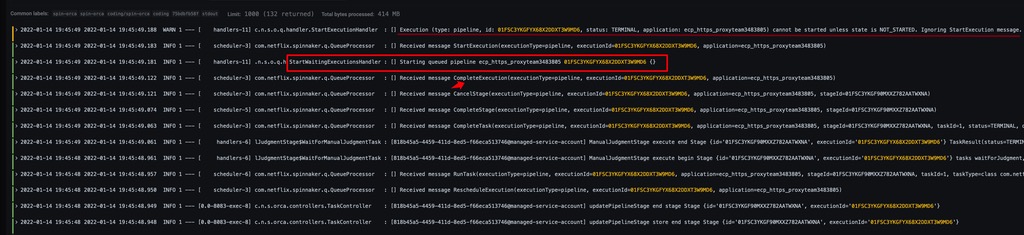
这里最主要的问题是不会再从 orca.pipeline.queue.${pipeline_config_id} 中取,也就是说,如果队列中还有排队的 execution,将得不到执行。所以可以从日志中看到,01FSC3YKGFYX68X2DDXT3W9MD6 执行完成后,又从队列中取到了一模一样的消息,再次启动该流水线时发现状态不符合要求,也不再执行等待队列中的其他 execution。
修复思路
在尝试启动排队的 execution 时,对该 execution 的状态做判断,不满足要求,直接 push(StartWaitExecution),此时,后续的执行又会从 StartWaitExecutionHandler 的入口开始,类似于一个 for 循环;满足要求的 execution,直接 push(StartExecution),尝试执行下一个 execution。
修复后的代码如下:
@Component
class StartWaitingExecutionsHandler(
  override val queue: Queue,
  override val repository: ExecutionRepository,
  private val pendingExecutionService: PendingExecutionService
) : OrcaMessageHandler<StartWaitingExecutions> {

  private val log: Logger get() = LoggerFactory.getLogger(javaClass)

  override val messageType = StartWaitingExecutions::class.java

  override fun handle(message: StartWaitingExecutions) {
    if (message.purgeQueue) {
      // when purging the queue, run the latest message and discard the rest
      pendingExecutionService.popNewest(message.pipelineConfigId)
        .also { _ ->
          pendingExecutionService.purge(message.pipelineConfigId) { purgedMessage ->
            when (purgedMessage) {
              is StartExecution -> {
                log.info("Dropping queued pipeline {} {}", purgedMessage.application, purgedMessage.executionId)
                queue.push(CancelExecution(purgedMessage))
              }
              is RestartStage -> {
                log.info("Cancelling restart of {} {}", purgedMessage.application, purgedMessage.executionId)
                // don't need to do anything else
              }
            }
          }
        }
    } else {
      // when not purging the queue, run the messages in the order they came in
      pendingExecutionService.popOldest(message.pipelineConfigId)
    }
      ?.let {
        when (it) {
          is StartExecution -> {
            try {
              val startedExecution: Execution = repository.retrieve(it.executionType, it.executionId)
              if (startedExecution.status != ExecutionStatus.NOT_STARTED || startedExecution.isCanceled) {
                log.info(
                  "Dropping queued pipeline {} {}, because its status was {}, which can not be stated",
                  startedExecution.application, startedExecution.id, startedExecution.status
                )
                queue.push(message)
                return
              }
            } catch (enfe: ExecutionNotFoundException) {
              log.debug("queued pipeline {} {} not found, and can be started later", it.application, it.executionId)
            }
          }
        }
        // spoiler, it always is!
        if (it is ExecutionLevel) {
          log.info("Starting queued pipeline {} {} {}", it.application, it.executionId)
        }
        queue.push(it)
      }
  }
}
