2 | SpringCloud:OpenFeign从入门到上天
在前篇的基础上,对整个demo项目进行了重新的规划,包括模块名、包名的修改,以及对接口进行了调整,并将模块调用改成了OpenFeign,这个用起来更加方便,连RestTemplate都不需要使用即可完成调用。修改之后的demo项目整体架构如下:.├── module01│ ├── module0
在前篇的基础上,对整个demo项目进行了重新的规划,包括模块名、包名的修改,以及对接口进行了调整,并将模块调用改成了OpenFeign,这个用起来更加方便,连RestTemplate都不需要使用即可完成调用。修改之后的demo项目整体架构如下:
.
├── module01
│   ├── module01.iml
│   ├── pom.xml
│   └── src
│       └── main
│           ├── java
│           │   └── com
│           │       └── example
│           │           └── springcloud
│           │               └── demo
│           │                   ├── Module01Application.java
│           │                   ├── controller
│           │                   │   └── HelloController.java
│           │                   └── feign
│           │                       ├── MultiLanguageHelloFeignClient.java
│           │                       ├── custom
│           │                       │   └── MultiLanguageHelloClientConfiguration.java
│           │                       └── fallback
│           │                           └── MultiLanguageHelloFeignClientFallback.java
│           └── resources
│               └── bootstrap.yaml
├── module02
│   ├── module02.iml
│   ├── pom.xml
│   └── src
│       └── main
│           ├── java
│           │   └── com
│           │       └── example
│           │           └── springcloud
│           │               └── demo
│           │                   ├── Module02Application.java
│           │                   └── controller
│           │                       └── MultiLanguageHelloController.java
│           └── resources
│               └── bootstrap.yaml
├── pom.xml
└── spring-cloud-demo.iml
Ribbon 是 Netflix开源的基于HTTP和TCP等协议负载均衡组件。可以用来做客户端负载均衡,调用注册中心的服务。如果单纯使用Ribbon,需要代码里手动调用目标服务,请参考官方示例。
Feign是Spring Cloud组件中的一个轻量级RESTful的HTTP服务客户端,并且它内置了Ribbon,用来做客户端负载均衡,去调用服务注册中心的服务。
不论怎么样,都要去官网上面瞄一瞄OpenFeign的README.md。
配置流程
如果只是简单使用OpenFeign,它的步骤很简单,只需要引入依赖、开启FeignClient、新建接口、设置连接信息,然后调用即可完成。但如果需要进行一些定制化的话,就需要做一些额外的工作,比如自己创建相关的bean。
如果想对OpenFeign做更多的定制化,则需要仔细研究一下OpenFeign提供的README.md里面的样例。
这里贴出来它用到的注解:
| Annotation | Interface Target | Usage |
|---|---|---|
@RequestLine |
Method | Defines the HttpMethod and UriTemplate for request. Expressions, values wrapped in curly-braces {expression} are resolved using their corresponding @Param annotated parameters. |
@Param |
Parameter | Defines a template variable, whose value will be used to resolve the corresponding template Expression, by name. |
@Headers |
Method, Type | Defines a HeaderTemplate; a variation on a UriTemplate. that uses @Param annotated values to resolve the corresponding Expressions. When used on a Type, the template will be applied to every request. When used on a Method, the template will apply only to the annotated method. |
@QueryMap |
Parameter | Defines a Map of name-value pairs, or POJO, to expand into a query string. |
@HeaderMap |
Parameter | Defines a Map of name-value pairs, to expand into Http Headers |
@Body |
Method | Defines a Template, similar to a UriTemplate and HeaderTemplate, that uses @Param annotated values to resolve the corresponding Expressions. |
接下来开始最简单的配置与使用,以对其有个基本的印象。
①引入依赖
<dependency>
    <groupId>org.springframework.cloud</groupId>
    <artifactId>spring-cloud-starter-openfeign</artifactId>
</dependency>
②开启FeignClient,即启动类上面加上@EnableFeignClients注解
package com.example.springcloud.demo;

import org.springframework.boot.SpringApplication;
import org.springframework.boot.autoconfigure.SpringBootApplication;
import org.springframework.cloud.client.discovery.EnableDiscoveryClient;
import org.springframework.cloud.openfeign.EnableFeignClients;

@SpringBootApplication
@EnableDiscoveryClient
@EnableFeignClients
public class Module01Application {
    public static void main(String[] args) {
        SpringApplication.run(Module01Application.class, args);
    }
}
③创建接口,即FeignClient,并初始化连接信息。name指定模块,@RequestMapping指定url。
@Component
@FeignClient(name = "module02")
public interface MultiLanguageHelloFeignClient {

    @RequestMapping(value = "hello/cn")
    String getChineseHello();

}
此处有个疑问,Feign貌似能够识别RequestMapping注解,不必使用前面提到的RequestLine,但是并没有看到文档上有什么说明。使用别人没有申明的东西,没有安全感。
④注入MultiLanguageHelloFeignClient,调用getChineseHello()方法
package com.example.springcloud.demo.controller;

import com.example.springcloud.demo.feign.MultiLanguageHelloFeignClient;
import org.springframework.beans.factory.annotation.Autowired;
import org.springframework.beans.factory.annotation.Value;
import org.springframework.cloud.context.config.annotation.RefreshScope;
import org.springframework.web.bind.annotation.RequestMapping;
import org.springframework.web.bind.annotation.RestController;

@RestController
@RequestMapping("hello")
@RefreshScope
public class HelloController {
    @Value(value = "${server.port}")
    private String port;

    @Autowired
    private MultiLanguageHelloFeignClient multiLanguageHelloFeignClient;

    @RequestMapping("")
    public String getDefault() {
        return "hi" + " -- from port: " + port;
    }

    @RequestMapping("/cn")
    public String getStrViaNacos() {
        return multiLanguageHelloFeignClient.getChineseHello() + " -- from port: " + port;
    }
}
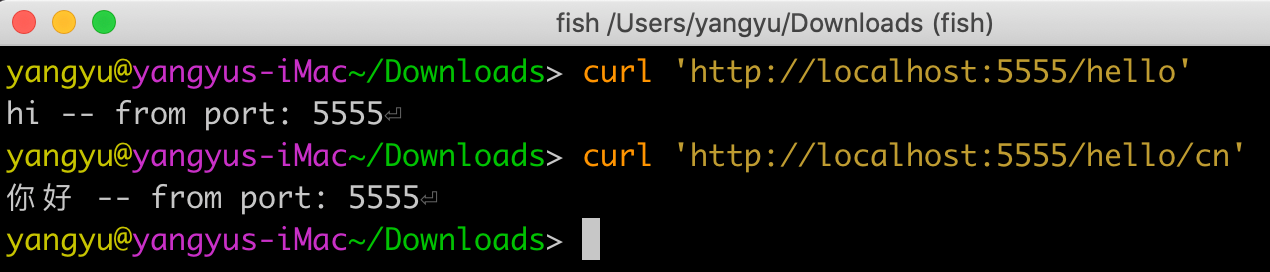
⑤启动module01和module02,调用结果如下,可以看出配置生效
自定义配置
开启fallback
fallback也就是当所调用的服务没有起来的时候,会执行该方法。不知道返回一个错误。
①开启hystrix
feign:
  hystrix:
    enabled: true
②实现MultiLanguageHelloFeignClient,编写fallback,作为失败时的返回结果
package com.example.springcloud.demo.feign.fallback;

import com.example.springcloud.demo.feign.MultiLanguageHelloFeignClient;
import org.springframework.stereotype.Component;

@Component
public class MultiLanguageHelloFeignClientFallback implements MultiLanguageHelloFeignClient {
    @Override
    public String getChineseHello() {
        return "service down";
    }
}
③指定fallback
@Component
@FeignClient(name = "module02", fallback = MultiLanguageHelloFeignClientFallback.class)
public interface MultiLanguageHelloFeignClient {
    @RequestMapping(value = "hello/cn")
    String getChineseHello();
}
自定义HTTP客户端
首先,Feign默认的HTTP客户端是JDK自带的HTTP客户端:HttpURLConnection。有代码为证:
// Feign.java $ Builder
private Client client = new Client.Default(null, null);

// Client.java
class Default implements Client {
  // ...
  @Override
  public Response execute(Request request, Options options) throws IOException {
    HttpURLConnection connection = convertAndSend(request, options);
    return convertResponse(connection, request);
  }
  // ...
}
指定其他客户端、设置其他参数,如重试相关
@Value("${retry.period:3000}")
private int period;

@Value("${retry.maxPeriod:30000}")
private int maxPeriod;

@Value("${retry.maxAttempts:5}")
private int maxAttempts;

@Bean
AuthClient authClient() {
    return Feign.builder()
            .retryer(new Retryer.Default(period, maxPeriod, maxAttempts))
            .target(AuthClient.class, baseServerUrl);
}
总体而言,简易的配置完成了,并且也能工作。
