SpringBoot配置双数据库源
最近遇到一个需要在项目中配置双数据源的需求,虽然在同一个项目中使用两个独立的数据库,听起来有点扯,但是本着试一试的想法,尝试着在项目中进行了双数据源的配置。成功配置,但是遇到了比较多的坑,感觉还挺有意思的。后面成功配置好了之后,经过商讨,在此项目中配置双数据源并不合适,于是直接revert掉了。大致
最近遇到一个需要在项目中配置双数据源的需求,虽然在同一个项目中使用两个独立的数据库,听起来有点扯,但是本着试一试的想法,尝试着在项目中进行了双数据源的配置。成功配置,但是遇到了比较多的坑,感觉还挺有意思的。后面成功配置好了之后,经过商讨,在此项目中配置双数据源并不合适,于是直接revert掉了。
大致流程
如果是只有一个数据源,我们在需要使用数据库的时候,只需要调用Mapper相关方法即可。这里使用的ORM框架是MyBatis。也就是说框架自动会给我们配置好MyBatis相关的参数,让我们可以直接使用。直接使用MyBatis进行数据库操作的的流程,可以参看其官网的教程。
目前在yaml中的配置如下:
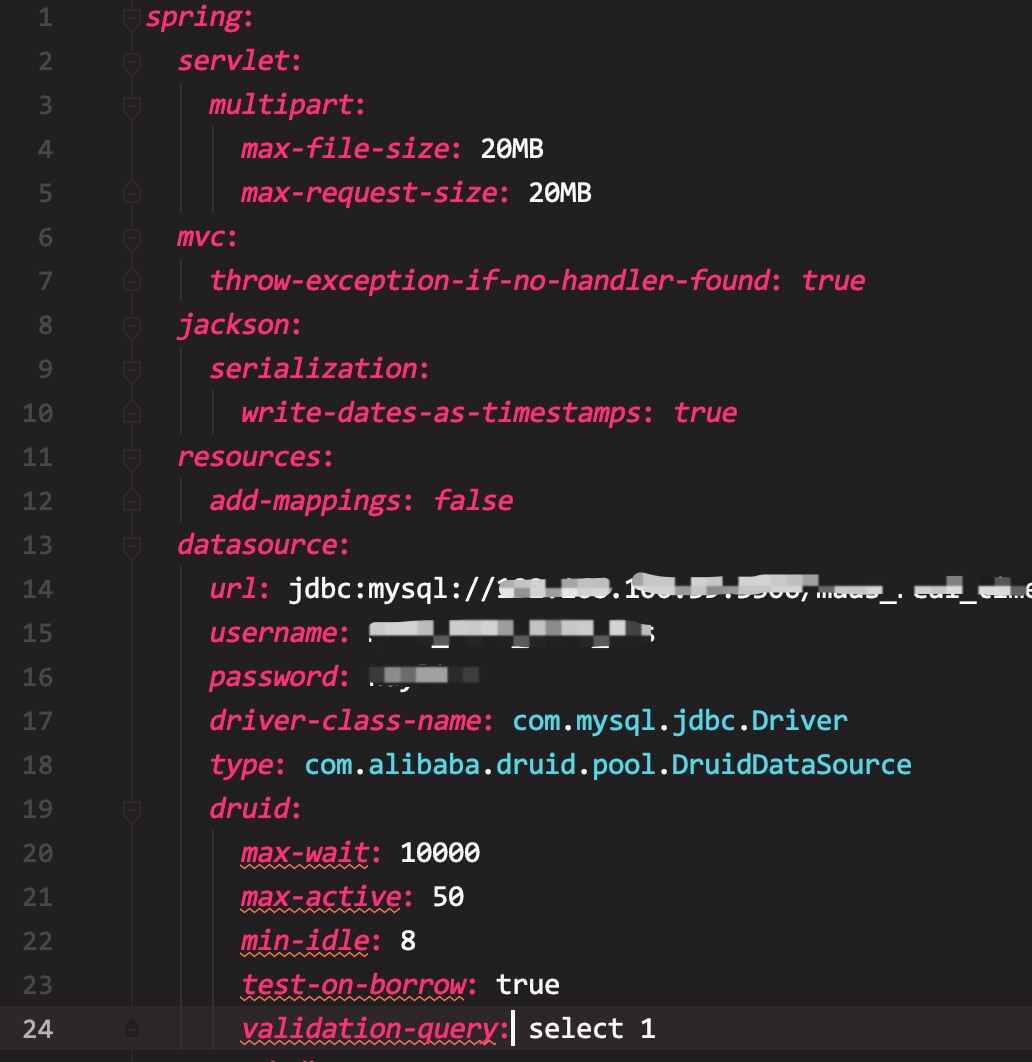
所以肯定会有一个解析spring.datasource、并将其配置成连接数据库所需信息的地方。因此我们也需要将第二个数据库信息配置到yaml文件中。如下:
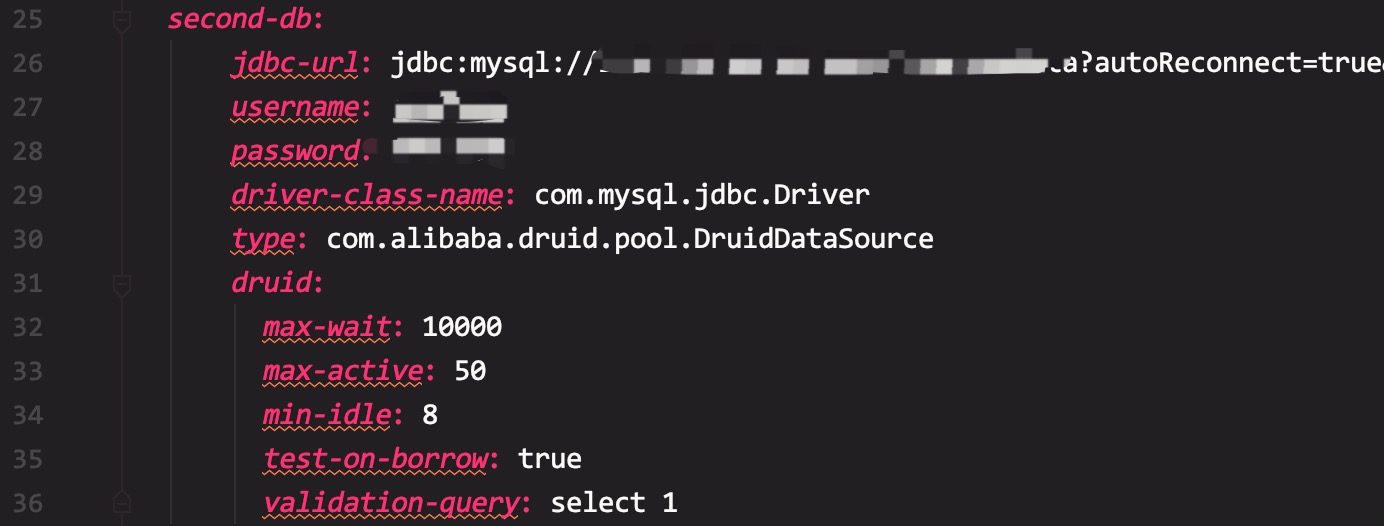
然后让Spring为我们生成一个数据库源信息相关的bean。再为不同的数据源设置不同的MyBatis配置。
成功实现版本
主数据源的配置信息如下代码所示。此处为了更清晰的描述,特意为bean加上了相应的名字。
@Configuration
@MapperScan(basePackages = {"相应包名"}, sqlSessionTemplateRef = "sqlSessionTemplate")
public class MainDataSourceConfig {
    // 未指明bean的名称时,优先使用该bean
    @Primary
    @Bean(name = "dataSource")
    // 设置数据库属性来源
    @ConfigurationProperties(prefix = "spring.datasource")
    public DataSource dataSource(){
        // 默认是Hikari
        return DataSourceBuilder.create().type(DruidDataSource.class).build();
    }

    @Primary
    @Bean(name = "sqlSessionFactory")
    public SqlSessionFactory sqlSessionFactory(@Qualifier("dataSource")DataSource dataSource) throws Exception {
        SqlSessionFactoryBean bean = new SqlSessionFactoryBean();
        // 设置Mapper.xml文件的扫描处
        bean.setMapperLocations(new PathMatchingResourcePatternResolver().getResources("classpath:mappers/*.xml"));
        // mybatis相关设置
        bean.setConfigLocation(new ClassPathResource("mybatis-config.xml"));
        bean.setDataSource(dataSource);
        return bean.getObject();
    }

    @Primary
    @Bean
    public DataSourceTransactionManager transactionManager(@Qualifier("dataSource") DataSource dataSource) {
        return new DataSourceTransactionManager(dataSource);
    }

    @Primary
    @Bean
    public SqlSessionTemplate sqlSessionTemplate(@Qualifier("sqlSessionFactory") SqlSessionFactory sqlSessionFactory) {
        return new SqlSessionTemplate(sqlSessionFactory);
    }
}
第二数据库配置信息,基本与上面类似,如下:
@Configuration
@MapperScan(basePackages = "相应包名", sqlSessionTemplateRef = "secondSqlSessionTemplate")
public class CustomDataSourceConfig {

    @Bean(name = "secondDataSource")
    @ConfigurationProperties(prefix = "spring.second-db")
    public DataSource secondDataSource() {
        return DataSourceBuilder.create().type(DruidDataSource.class).build();
    }

    @Bean(name = "secondSqlSessionFactory")
    public SqlSessionFactory firstSqlSessionFactory(@Qualifier("secondDataSource") DataSource dataSource) throws Exception{
        SqlSessionFactoryBean bean=new SqlSessionFactoryBean();
        bean.setMapperLocations(new PathMatchingResourcePatternResolver().getResources("classpath:phdsun-mappers/*.xml"));
        bean.setConfigLocation(new ClassPathResource("mybatis-config.xml"));
        bean.setDataSource(dataSource);
        return bean.getObject();
    }

    @Bean(name = "secondSqlSessionTemplate")
    public SqlSessionTemplate secondSqlSessionTemplate(@Qualifier("secondSqlSessionFactory") SqlSessionFactory sqlSessionFactory) throws  Exception{
        return new SqlSessionTemplate(sqlSessionFactory);
    }
}
使用
直接调用相关的mapper
