SpringBoot中全局异常的捕获与包装
@ControllerAdvice从Spring3.2开始,引入了一个叫做@ControllerAdvice的注解,这个注解用来编写含有 @ExceptionHandler, @InitBinder, or @ModelAttribute这三个注解的类。官方文档注释如下:这个注解有几个参数,可以用来
@ControllerAdvice
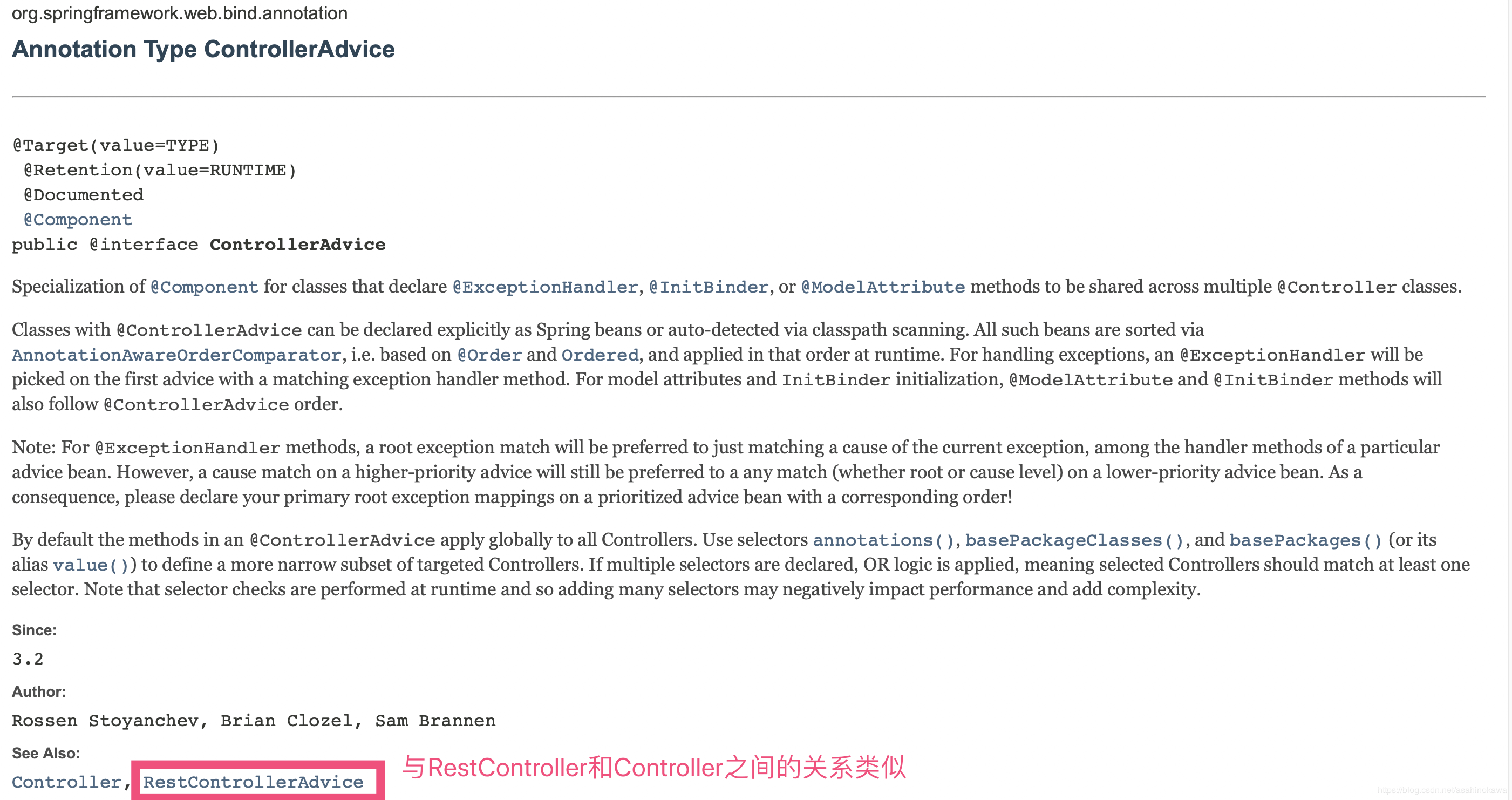
从Spring3.2开始,引入了一个叫做@ControllerAdvice的注解,这个注解用来编写含有 @ExceptionHandler, @InitBinder, or @ModelAttribute这三个注解的类。官方文档注释如下:
这个注解有几个参数,可以用来限定该类对哪些Controller起作用:
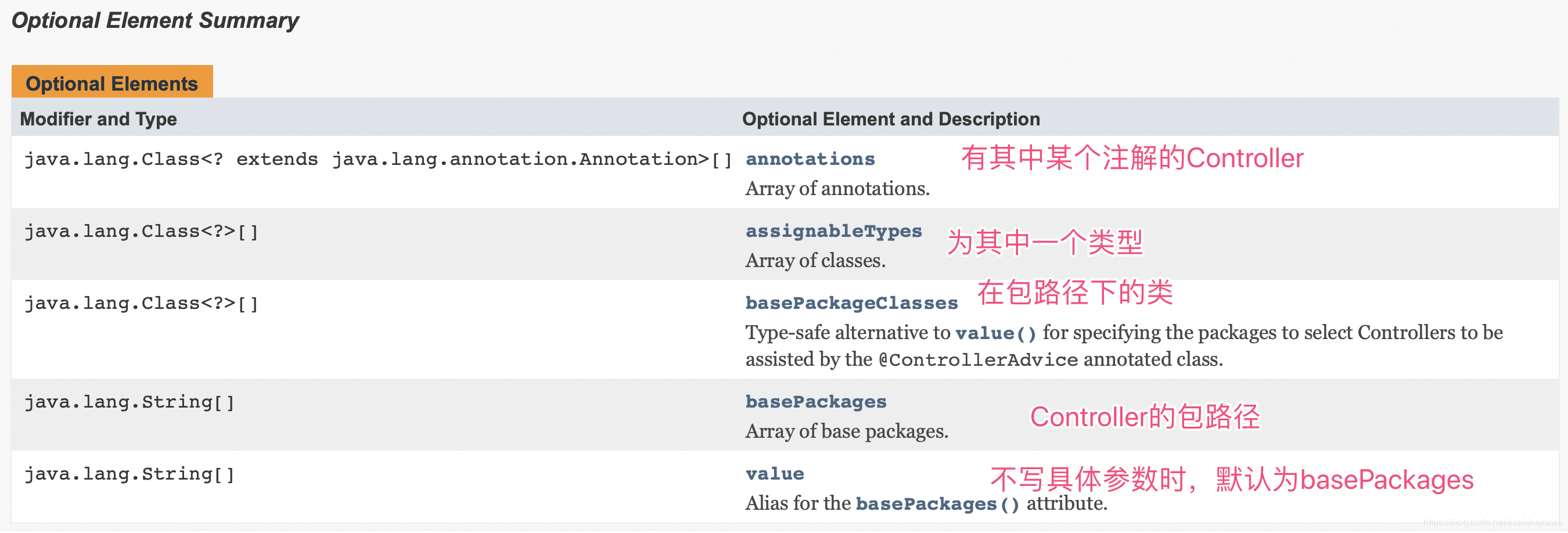
所以比起上面的参数,我们更需要关心的是被该注解注解过得类里面的其他三个注解。
@ExceptionHandler
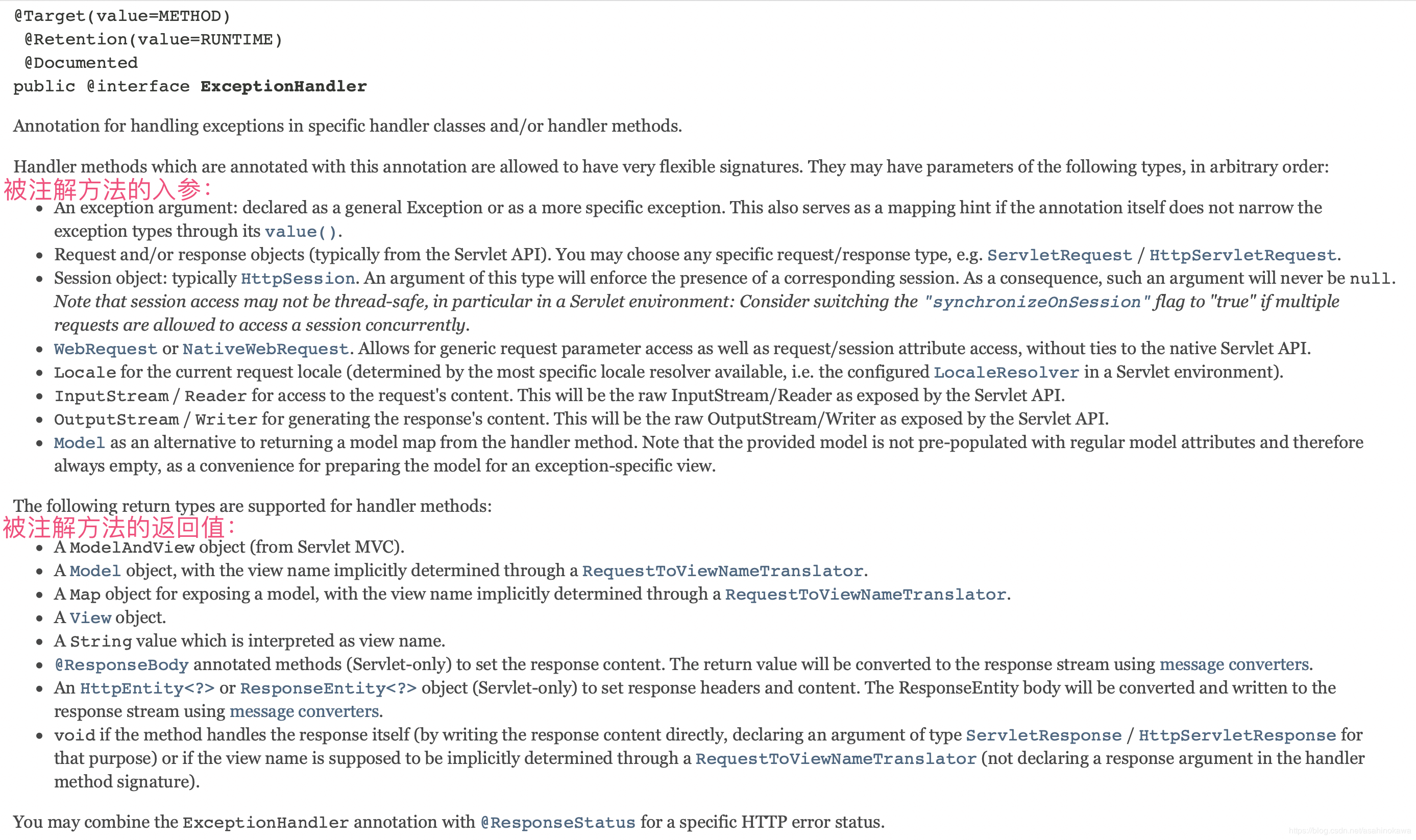
当Controller捕捉到异常后,若异常类型匹配,将执行被该注解注解的方法。其中,value值为异常的类型,表示该注解处理该类型,如下:

该被注解方法的入参和出参:
实践
项目中使用到的编码如下:
@ControllerAdvice
public class ExceptionHandle {

    public static final Logger logger = LoggerFactory.getLogger(ExceptionHandle.class);
    private static final Map<String, String> EMPTY_DATA = new HashMap<>();

    @ResponseBody
    @ExceptionHandler(value = Exception.class) // 处理所有异常
    public JsonView exceptionGet(Exception e) {
        logger.error("Exception for handle ", e);
        // 自定义类,项目中用作API统一响应模板
        JsonView jsonView;
        if (e instanceof ApplicationException) { // 项目中用到的自定义异常
            jsonView = new JsonView();
            jsonView.setData(EMPTY_DATA);
            ApplicationException applicationException = (ApplicationException) e;
            jsonView.setCode(applicationException.getRetStub().getCode());
            jsonView.setMessage(applicationException.getRetStub().getMsg());
        } else if (e instanceof ConstraintViolationException) {
            ConstraintViolationException applicationException = (ConstraintViolationException) e;
            Set<ConstraintViolation<?>> violations = applicationException.getConstraintViolations();
            StringBuilder stringBuilder = new StringBuilder();
            for (ConstraintViolation<?> item : violations) {
                stringBuilder.append("[" + item.getMessage() + "]");
            }
            String msg = stringBuilder.toString();
            logger.error("ConstraintViolation msg is : " + msg);
            jsonView = new JsonView(SysStubInfo.PARAMETER_TYPE_INVALID, msg, EMPTY_DATA);
        } else if (e instanceof MethodArgumentNotValidException) {
            MethodArgumentNotValidException applicationException = (MethodArgumentNotValidException) e;
            List<ObjectError> allErrors = applicationException.getBindingResult().getAllErrors();
            StringBuilder stringBuilder = new StringBuilder();
            for (ObjectError error : allErrors) {
                stringBuilder.append("[" + error.getDefaultMessage() + "]");
            }
            String msg = stringBuilder.toString();
            logger.error("ArgumentNotValid  msg is : " + msg);
            jsonView = new JsonView(SysStubInfo.PARAMETER_TYPE_INVALID, msg, EMPTY_DATA);
        } else if (e instanceof MissingServletRequestParameterException) {
            MissingServletRequestParameterException applicationException = (MissingServletRequestParameterException) e;
            String parameterName = applicationException.getParameterName();
            String parameterType = applicationException.getParameterType();
            StringBuilder stringBuilder = new StringBuilder();
            stringBuilder
                    .append("parameter " + parameterName + " is null " + " , expect: " + parameterType);
            String msg = stringBuilder.toString();
            jsonView = new JsonView(SysStubInfo.PARAMETER_IS_NULL, msg, EMPTY_DATA);
        } else if (e instanceof HttpMediaTypeNotSupportedException) {
            HttpMediaTypeNotSupportedException applicationException = (HttpMediaTypeNotSupportedException) e;
            StringBuilder stringBuilder = new StringBuilder();
            stringBuilder.append(applicationException.getContentType().getSubtype());
            String msg = stringBuilder.toString();
            jsonView = new JsonView(SysStubInfo.CONTENT_TYPE_INVALID, msg, EMPTY_DATA);
        } else if (e instanceof HttpRequestMethodNotSupportedException) {
            HttpRequestMethodNotSupportedException applicationException = (HttpRequestMethodNotSupportedException) e;
            StringBuilder stringBuilder = new StringBuilder();
            stringBuilder.append(applicationException.getMethod());
            String msg = stringBuilder.toString();
            jsonView = new JsonView(SysStubInfo.METHOD_INVALID, msg, EMPTY_DATA);
        } else if (e instanceof NoHandlerFoundException) {
            NoHandlerFoundException applicationException = (NoHandlerFoundException) e;
            StringBuilder stringBuilder = new StringBuilder();
            stringBuilder.append(
                    applicationException.getHttpMethod() + " --> " + applicationException.getRequestURL());
            String msg = stringBuilder.toString();
            jsonView = new JsonView(SysStubInfo.RESOURCE_INVALID, msg, EMPTY_DATA);
        } else if (e instanceof MethodArgumentTypeMismatchException) {
            MethodArgumentTypeMismatchException applicationException = (MethodArgumentTypeMismatchException) e;
            StringBuilder stringBuilder = new StringBuilder();
            stringBuilder.append(
                    "parameter " + applicationException.getName() + " is not type of " + applicationException
                            .getRequiredType().getSimpleName());
            String msg = stringBuilder.toString();
            jsonView = new JsonView(SysStubInfo.PARAMETER_TYPE_INVALID, msg, EMPTY_DATA);
        } else if (e instanceof HttpMessageNotReadableException) {
            HttpMessageNotReadableException applicationException = (HttpMessageNotReadableException) e;
            StringBuilder stringBuilder = new StringBuilder();
            stringBuilder.append(applicationException.getMessage());
            String msg = stringBuilder.toString();
            jsonView = new JsonView(SysStubInfo.REQUEST_BODY_INVALID, msg, EMPTY_DATA);
        } else if (e instanceof BindException) {
            BindException applicationException = (BindException) e;
            BindingResult bindingResult = applicationException
                    .getBindingResult();
            FieldError fieldError = bindingResult.getFieldError();
            String field = fieldError.getField();
            // String code = fieldError.getCode();
            StringBuilder stringBuilder = new StringBuilder();
            stringBuilder.append(field);
            String msg = stringBuilder.toString();
            jsonView = new JsonView(SysStubInfo.PARAMETER_IS_NULL, msg, EMPTY_DATA);
        } else {
            jsonView = new JsonView(SysStubInfo.DEFAULT_FAIL, EMPTY_DATA);
        }
        return jsonView;
    }
}
希望自己能够对正在进行中的项目的架构有一个比较清晰的认识。
